A Snapchat Private Story is visible only to the friends you choose. A Public Profile is a page anyone can open, and it shows your active public Stories to friends, followers and visitors alike. Neither is a global setting. You pick the audience again on the “Send To” screen every time you post, so one wrong tap can send a personal Snap to a public audience.
This guide is written from the poster’s side. It covers what each destination does, where each audience actually finds your Story, what stays visible after the 24-hour mark, who else can post on your behalf, and how to audit all of it in about ten minutes. Platform details were checked against Snapchat’s Help Center and Snap’s own creator and privacy pages.
The Quick Answer
| Where you post | Who can see it | Where you set it |
|---|---|---|
| My Story · Friends (My Friends) | All of your friends | Settings, then Privacy Controls, then View My Story |
| My Story · Friends (Custom) | Your friends, except the people you exclude | Settings, then Privacy Controls, then View My Story |
| Private Story | Only the friends you choose | When you create it |
| My Story · Public | Friends, followers, and anyone who visits your Public Profile | “Send To” screen, at posting time |
The first three stay inside your circle. Only My Story · Public reaches people outside it.
The “Send To” Screen Is Where the Audience Is Decided
Every Snap ends at the Send To screen, and that is where the privacy decision happens. According to Snapchat’s Help Center, My Story · Friends and My Story · Public are two separate posting destinations. Snaps sent to My Story · Friends are visible only to the friends you have added back. The public option is a different choice on the same screen. In the Android app we checked the two options read “My Story · Friends only” (subtitle: Just for friends) and “My Story · public” (subtitle: Friends, followers and everyone). This guide uses Snapchat’s Help Center names, My Story · Friends and My Story · Public
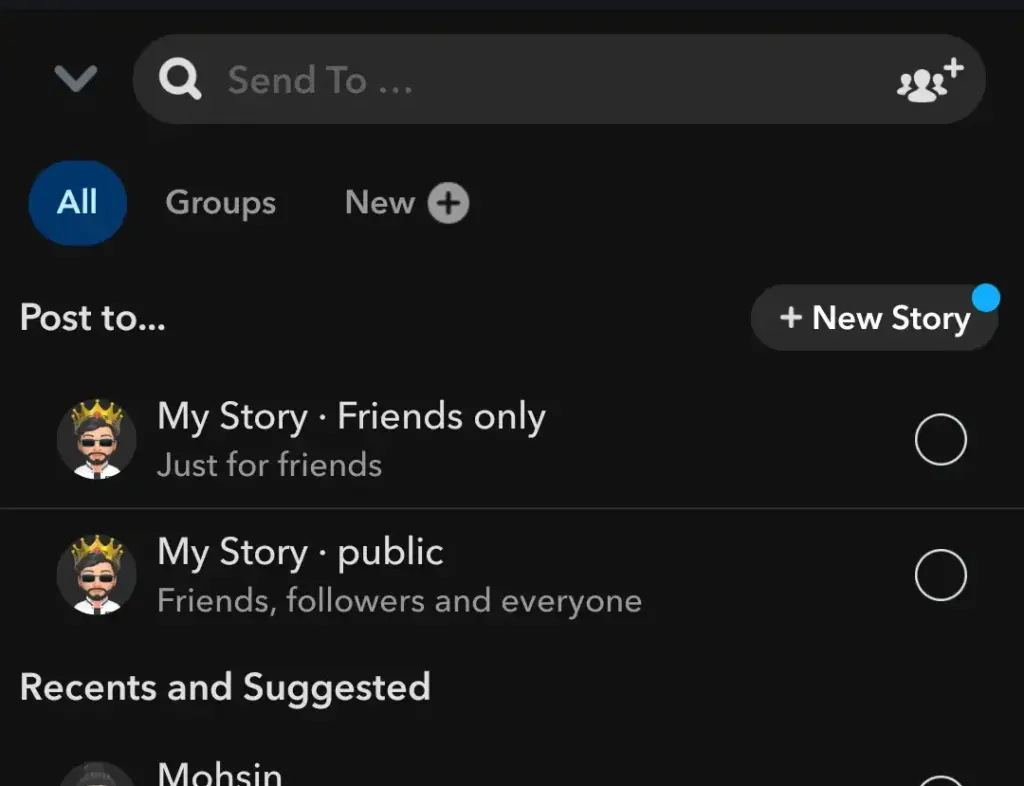
If you remember a View My Story setting called Everyone, Snapchat says it was replaced by this public destination. On accounts that have the new setup, the audience comes from where you post each Snap, not from one switch in Settings. Public posting also depends on your age and region, so if My Story · Public isn’t on your Send To screen, your account doesn’t offer it.
My Story · Friends: My Friends and Custom
Your regular Story is for friends, meaning people you have added back. Snapchat’s creator guide says you control it in Settings: open Privacy Controls and set View My Story to My Friends or Custom.
My Friends lets everyone on your friend list watch. Custom lets you exclude specific friends without removing them from the list, which suits a colleague, a distant relative or an old classmate you want to stay connected to but not share every Snap with.
One detail matters here. Custom works by exclusion, so anyone you add as a friend later can see your Story unless you add them to the excluded list. A Custom setup that was right a year ago can be wrong today.
Private Story: A Smaller, Named Circle
A Private Story is built the other way around. Instead of excluding people from everyone, you name the few who can see it. According to Snapchat’s Help Center, only you can add Snaps to a Private Story, and only you decide which friends can view it. It carries a padlock icon, and you can keep up to 20 Private or Shared Stories at once. The friends you choose see those Snaps alongside your My Story, though on Android the two may appear separately. Friends who can’t view it are not notified that you have one.
If you want friends to add their own Snaps, Snapchat points to a Shared Story instead. A Private Story stays yours alone.
| Feature | Custom (My Story · Friends) | Private Story |
|---|---|---|
| How the audience is set | Every friend except the people you exclude | Only the friends you pick |
| A friend you add later | Sees your Story automatically | Sees nothing until you add them |
| Who adds Snaps | You | You |
| Best for | Keeping one or two people out of everyday posts | Snaps meant for a small group |
My Story · Public and Your Public Profile
The two terms work together. My Story · Public is the Story you post for a wider audience. Your Public Profile is the page where that Story appears, along with the other public content you choose to show. Snap’s privacy page says a Public Profile can showcase public Stories, Spotlights and Lenses.
What matters for a poster is that a public Story doesn’t live in one place. Different viewers find it in different spots:
| Who is watching | Where they find your public Story |
|---|---|
| A friend | The Friends section of the Stories page |
| A follower you haven’t added back | The Following section of the Stories page |
| Anyone who visits your Public Profile | On the profile itself, as an active Story |
| A wider audience | Discover, if you are a creator aged 18 or over with an established audience |
| People browsing the Snap Map | Place Profiles, when the Snap carries a Place Tag |
These placements come from Snapchat’s Help Center and creator guide. A follower is someone who follows your Public Profile without you adding them back, and Snapchat says people can follow you from Spotlight, Discover or the Add button on your profile. The follower count is off by default, though you can turn it on in Settings.
A public Story is also not the same thing as Spotlight. A public Story goes to your friends, followers and profile visitors and expires on the normal timer. Spotlight is Snapchat’s separate public video feed.
What a Public Story Looks Like From Outside Snapchat
We tested this from the viewer’s side. We entered the username of an account with a public Story into the snapchat story viewer, with no login and no app. Its active Snaps appeared together on a single page.
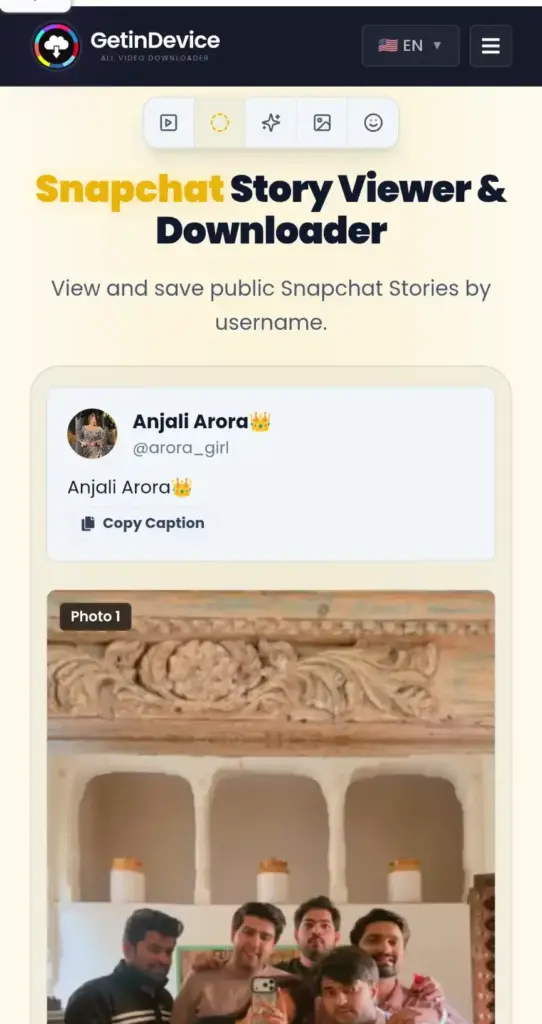
The takeaway for a poster is that “public” doesn’t mean “visible to people who have Snapchat.” It means visible to any visitor. If you post a public Story, assume a person you have never met can watch it in a browser, and that a copy can be saved from the public link, which the Snapchat downloader handles for public posts. The same lookup can’t open a friends-only or Private Story, because those never reach a signed-out visitor. How anonymous viewing works in detail is covered in our guide on whether Snapchat shows who viewed your Story.
What Stays Visible After 24 Hours
Whichever audience you pick, a public My Story expires like a normal one, and most Stories delete after 24 hours. Snap’s privacy page lists three exceptions, and each one is worth understanding as a poster:
- You change the settings. Audience and timing changes affect what stays up, so review them rather than assuming the default.
- You save the Story to your Public Profile. A Story saved there can stay visible to every visitor long after the day you posted it. Snapchat’s creator guide puts the saving step under My Public Profile, then Stories. Anything saved is yours to remove later, but nothing removes it for you.
- You or a friend saves it in Chat. After a friend saves a Snap, it is outside your control.
Audience settings also decide who can open a Snap, not what that person does next. Snapchat’s Help Center warns that anyone who can view a Private Story can screenshot or screen record it, and the same logic applies to a friends-only Story and a public one. For how the alerts behave when someone captures a Snap, see our guide on screenshotting Snapchat and notifications.
The practical rule is to choose the audience you trust with the content, not the audience the setting appears to protect you from.
Who Else Can Post to Your Public Profile
If you run a profile for a brand, a shop or a team, the audience includes more than viewers. Snap’s creator guide describes roles on a Public Profile. Profile Admins can manage the profile, add or remove Snaps from the public Story, manage Highlights and assign roles. Collaborators can view insights and add or remove Snaps from the public Story.
That makes the role list part of your audience controls. Someone who left the team last year may still be able to post to a profile that thousands of people can see.
Which Destination Fits Which Situation
| Situation | Use | Why |
|---|---|---|
| Everyday moments with friends | My Story · Friends (My Friends) | It keeps things inside your circle |
| A Story you want to keep from specific people | My Story · Friends (Custom) | They stay on your friend list, and you don’t need a separate Story |
| Photos for family or a few close friends | Private Story | You name the viewers, and everyone else isn’t told it exists |
| Snaps your friends should add to too | Shared Story | Members can contribute, which a Private Story doesn’t allow |
| A creator, shop or brand | My Story · Public on a Public Profile | It reaches followers and visitors, and saved Stories stay on the profile |
| Anything involving other people’s children, addresses or workplaces | Private Story, or leave it off Snapchat | A public post can’t be recalled from people who already saw or saved it |
| A one-off Snap you aren’t sure about | Private Story first | Widening the audience later is easy, and taking back something public isn’t |
A Ten-Minute Audience Audit
- Check your default. Open Settings, then Privacy Controls, then View My Story. Confirm it says My Friends or Custom.
- Review your Custom list. Remove people who no longer need to be excluded, and add anyone you’ve befriended since. Because Custom works by exclusion, new friends see your Story automatically.
- Open each Private Story from your profile. Check who is in it and delete any you no longer use.
- Look at your Public Profile like a stranger would. If you have one, read every Story and Highlight on it. Anyone who visits can see them.
- Remove saved Stories that no longer fit. A Story saved to your profile stays up until you take it down.
- Check the role list. If other people can post to your Public Profile, confirm each one still should.
- See who actually watched a public Story. Snapchat says you can open your Public Profile and tap the public Story Snap to see which friends viewed it and the replies from followers.
- Read the label before you send. On the Send To screen, confirm whether the destination says Friends or Public.
Common Mistakes
- Assuming “private” means uncapturable. A Private Story limits who sees it, not what they save.
- Forgetting what is saved on the profile. A saved Story outlives the usual 24 hours, and visitors see it.
- Tapping My Story · Public by habit. The Send To screen is where most accidental public posts happen.
- Trusting an old Custom list. Friend lists change, and an old exclusion list can leave the wrong people in or out.
- Treating “public” as “app users only.” A public Story can be viewed by someone without an account, as the test above showed.
- Leaving old roles in place. A former teammate with posting access can change what thousands of people see.
Frequently Asked Questions
Only if you post it as My Story · Public. Stories posted to My Story · Friends, including Custom, or to a Private Story are limited to the people you chose.
Your regular profile is for friends. A Public Profile is a page anyone can visit, and it shows your active public Stories along with anything you saved to it.
Snapchat says followers you haven’t added back see it in the Following section of the Stories page. Friends see it in the Friends section.
Yes. Use Custom under View My Story and exclude that person. They stay on your friend list.
No. Snapchat says friends who can’t view your Private Story are not notified that you have one.
Yes. Snapchat warns that anyone who can view a Private Story can screenshot or screen record it.
It can stay visible to profile visitors beyond the usual 24 hours, so review those Stories from time to time.
No. A public Story reaches friends, followers and profile visitors and expires on its normal timer. Spotlight is a separate public video feed.
Yes. In our test, a public account’s active Stories loaded in a browser with no login. Private and friends-only Stories can’t be reached that way.