
TeraBox’s free plan gives you 1,024 GB of storage, but it limits each uploaded file to 4 GB, slows your transfers, plays video at roughly 480p, runs one app download at a time and shows ads. Premium raises the file limit to 128 GB, removes the speed limit and the ads, plays video at original quality and doubles storage to 2 TB. For most people, storage isn’t the limit that bites. Speed, file size and playback quality are.
Below you’ll find every limit in plain terms, what each plan actually changes, a table that turns free-plan speeds into real waiting time, and a simpler route if all you wanted was a video somebody shared with you.
The figures here come from TeraBox’s own plans page and help blog, checked against independent lab tests and reviews. TeraBox adjusts plans and promotions from time to time, so treat the plans page as the final word before you pay.
TeraBox free vs Premium at a glance
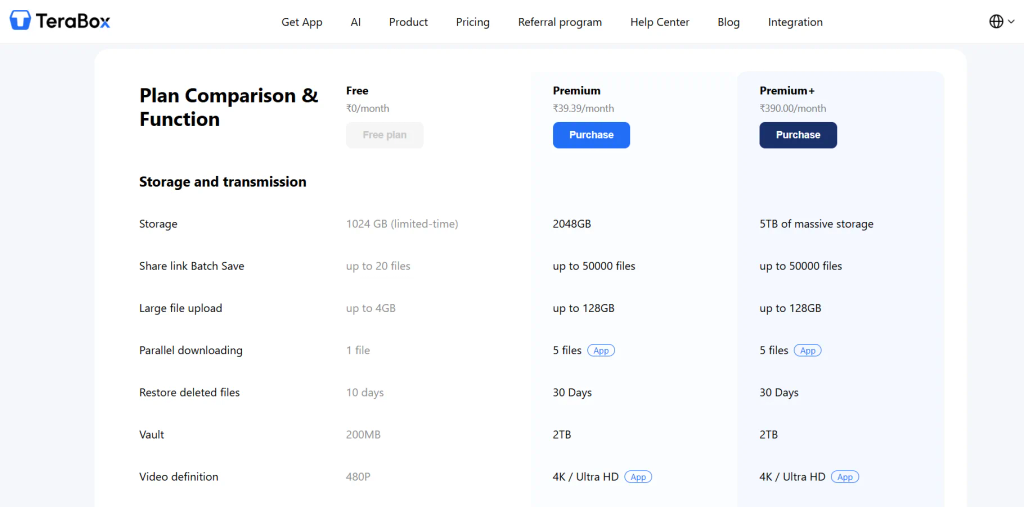
| Free | Premium | Premium+ | |
|---|---|---|---|
| Storage | 1,024 GB | 2,048 GB | 5 TB |
| Largest single upload | 4 GB | 128 GB | 128 GB |
| Files per transfer (batch) | 20 | 50,000 | 50,000 |
| Video playback | Compressed, 480p | Original quality | Original quality |
| Transfer speed | Throttled | Unthrottled | Unthrottled |
| Simultaneous app downloads | 1 | 5 | 5 |
| Deleted-file recovery | 10 days | 30 days | 30 days |
| Private vault | 200 MB | 2 TB | 2 TB |
| Cloud decompression and auto video backup | No | Yes | Yes |
| Ads | Yes | No | No |
| AI tools | Limited trials | Limited trials | Full set |
Premium costs a few dollars a month and Premium+ a little more, with lower effective prices on annual billing or promotions. Prices vary by region and offer, so check the plans page for your own number.
How much storage do you really get?
Free accounts list 1,024 GB, and TeraBox presents the free plan as permanent. The space is real, but it’s hard to fill. A 4 GB per-file cap and throttled transfers mean you’d spend a long time moving that much data in or out.
Premium doubles it to 2 TB and Premium+ goes to 5 TB. Here’s the part people miss: Premium+ keeps the same file-size and playback limits as Premium. The extra money buys space and the full set of AI tools (transcription, presentation maker, translation, text extraction and similar), not a faster or sharper service. If you’re only considering Premium+ for storage, ask yourself honestly whether you’ll ever pass 2 TB.
One more detail: files you upload or save into your own account count against the quota. Opening someone else’s public share link doesn’t. So a friend sending you a big file isn’t, on its own, a reason to pick a plan.
What is the TeraBox file size limit?
On the free plan, a single uploaded file can be up to 4 GB. Premium lists up to 128 GB. You’ll still see 20 GB quoted for Premium in older posts and some reviews. The current plans page lists 128 GB, so use that figure, and confirm it before you buy for large files.
4 GB sounds big until you meet real files. Long 4K phone recordings, event footage, disk images and raw project files regularly pass it. It also explains something you may have noticed on the receiving end: because a free account can’t hold a single file above 4 GB, large collections shared from free accounts usually arrive as many files or multi-part archives rather than one giant file.
Batch limits are a separate thing. On the web, uploads top out at around 300 files per batch, according to TeraBox’s help blog. The desktop and mobile apps don’t have that cap. TeraBox also lists a transfer quota of 20 files on Free and 50,000 on Premium, so if you move or save lots of files in one go, that’s the number to watch.
Premium also adds cloud decompression, which opens ZIP and similar archives inside the cloud instead of on your device, and automatic video backup. If you handle archives a lot, decompression saves you an entire transfer round trip.
How slow is TeraBox on the free plan?
Slow enough to plan around. TeraBox’s own help material puts free speeds at 200 to 800 KB/s and Premium at 15 to 20 MB/s. You’ll often see the free figure repeated as “1.5 to 6.25 MB/s”. That’s the same speed in megabits per second with the unit mislabeled.
Independent testing agrees on the direction. Cloudwards’ lab test found free-plan downloads took more than five times as long as Premium. User reports on large files range from roughly 100 KB/s to a few hundred KB/s. Busy hours make it worse.
Here’s what those speeds mean as waiting time. These are our own calculations, using 1 GB = 1,024 MB and ignoring overhead. The Premium columns assume your own connection can keep up with TeraBox’s stated speed.
| File size | Free at 200 KB/s | Free at 800 KB/s | Premium at 15 MB/s | Premium at 20 MB/s |
|---|---|---|---|---|
| 1 GB | about 87 min | about 22 min | about 1 min 8 s | about 51 s |
| 2 GB | about 2 h 55 min | about 44 min | about 2 min 17 s | about 1 min 42 s |
| 4 GB | about 5 h 50 min | about 87 min | about 4 min 33 s | about 3 min 25 s |
At around 500 KB/s, a 2 GB file takes a little over an hour. The free app also handles one transfer at a time, so a queue of files stacks the waits, while Premium runs up to five at once.
In our own test on a free account, a 546 MB file uploaded at about 243 KB/s.
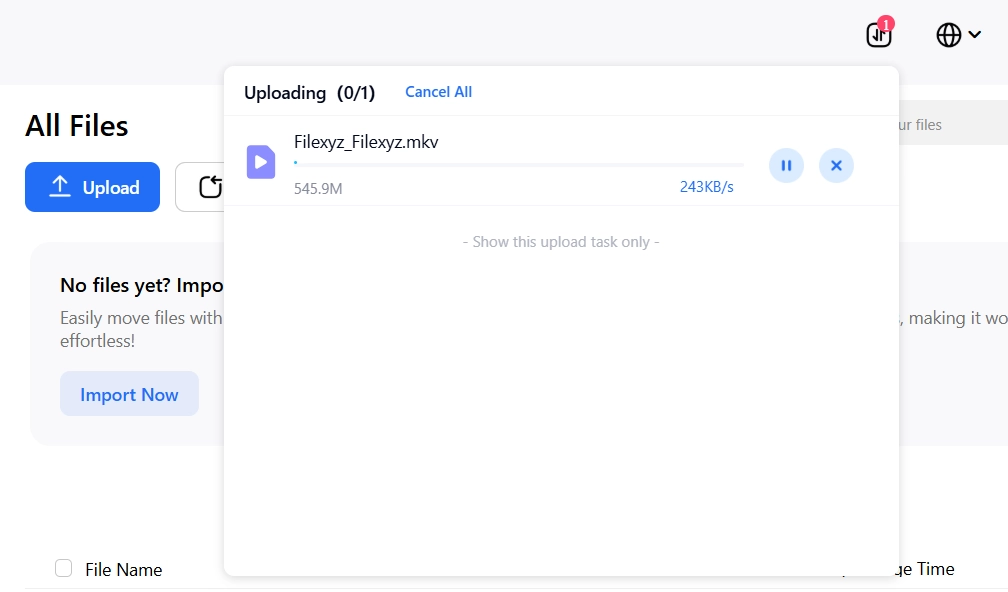
If you move files over 1 GB regularly, this is the limit that will cost you the most time. If you only need a single file someone else shared, though, there’s a simpler route that doesn’t involve paying. It’s covered further down.
Why does TeraBox video look blurry on the free plan?
Because the free player compresses it. When you watch video in the TeraBox app or web player, the free plan lists 480P playback, and reviews confirm that 4K files are scaled down to about 480p. TeraBox doesn’t publish a precise ceiling beyond that listing, and at least one review reported even lower, so treat 480p as the reference. Premium plays the original quality and adds multi-speed playback.
The important part is that this is a playback limit. The plans page doesn’t say TeraBox converts or shrinks the file you stored. A 1080p video you uploaded is still a 1080p file in your account. The free player just won’t show it that way. So blurry video inside TeraBox usually points to the playback cap, not a bad file.
That’s also why people who want the real quality go for the original file instead of the in-app stream. Our TeraBox downloader, covered below, returns a shared video as it was uploaded rather than the compressed stream. If your video stalls or freezes instead of looking soft, that’s a connection or throttling problem, and our guide to TeraBox video buffering walks through the fixes.
The smaller limits people miss
Recycle bin. Deleted files can be restored for 10 days on Free and 30 days on Premium. After that they’re gone.
Private vault. Free accounts get 200 MB of password-locked vault space, and Premium gets 2 TB. Independent reviews note that TeraBox doesn’t offer client-side encryption, so treat the vault as access control, not end-to-end encryption. If you store anything sensitive, encrypt it yourself before you upload.
Ads. Free accounts see ads in the app. Premium removes them.
Share link expiry. When you create a share link, TeraBox lets you set how long it stays valid, with options for 7 days, 30 days or permanent. You can also attach a short extraction code, which is TeraBox’s name for a link password. If a link you received stops working, expiry, deletion or a policy removal are the usual causes, and we cover them in TeraBox links not opening. If you’re the one sharing, see how to share large files with a TeraBox link.
When you only need one shared file
Everything above applies to people who hold an account. If someone sent you a public TeraBox share link, you don’t need a plan, and you often don’t need an account just to open it. What you do run into is the free-tier friction: the app install prompt, the ads and the slow transfer.
That’s the gap our TeraBox downloader is built for. You paste the share link and it returns the file itself, whether that’s a video, a photo, a ZIP or RAR archive, a PDF or an APK. There’s no account to create and no app to install. Nothing gets re-encoded, so a video keeps the resolution and bitrate it was uploaded at. A shared folder lists every file inside as its own entry, so you save only the ones you want.
It does have limits, and it’s better to know them up front. It can’t open links protected by an extraction code, because there’s no field to enter one. Ask the sender for the code and open the link in the TeraBox app. It can’t reach private files that were never shared, or files the uploader has since deleted. And it’s meant for files you have the right to access: your own, ones shared with you, or public shares you have permission to use.
Which TeraBox plan fits you?
| Your situation | Limits that matter | Best move |
|---|---|---|
| Storing documents and photos under 4 GB | Ads, slower transfers | Stay on Free |
| Uploading large videos or project files | 4 GB file cap, speed | Premium (128 GB per file) |
| Backing up a phone or camera roll regularly | Speed, one-at-a-time queue, no auto video backup | Premium |
| Watching videos inside TeraBox | 480p playback, ads | Premium for original quality |
| Sharing files with clients or friends | Link expiry settings, file cap on your side | Free works if files stay under 4 GB |
| Getting one file from a shared link | Plan limits barely apply | No plan needed: use our TeraBox downloader |
In short:
- Stay on Free if you store documents and photos, your files are under 4 GB and slow transfers don’t bother you.
- Choose Premium if you regularly move files over 4 GB, want original-quality playback, or you’re tired of ads and the one-at-a-time queue.
- Choose Premium+ only if you need 5 TB of space or the AI tools. For ordinary storage and playback it adds nothing over Premium.
- Skip the plan question if all you need is one shared file. A share-link tool handles that without a subscription.
- Look elsewhere if you need end-to-end encryption or real team collaboration. Premium makes TeraBox faster and cleaner, but it doesn’t change what kind of service it is.
TeraBox free vs Premium FAQ
Yes. The free plan lists 1,024 GB, but it comes with ads, a 4 GB per-file cap, throttled transfers and compressed playback.
4 GB per file. Premium lists up to 128 GB on the plans page, although older posts quote 20 GB.
The plans page lists 480P, and reviews measure 4K files scaled down to 480p. Premium plays original quality.
TeraBox’s own material gives 200 to 800 KB/s. Tests and user reports range from roughly 100 KB/s to a few hundred KB/s on large files, and slower at busy times.
The plans page describes the limit as playback quality. It doesn’t say the stored file is converted. Premium simply plays that file at original quality.
Only if you need 5 TB or the AI tools. The file-size and playback limits are the same.
No. A public share link opens without an account, and our TeraBox downloader saves the original file whichever plan you’re on, with no app to install. If the link has an extraction code, you’ll need that code from the sender and the TeraBox app.