
Quick answer: If a TeraBox file crawls at a few hundred KB/s while other sites download at your normal speed, the slowdown is on TeraBox’s side, mostly its free-tier speed limit. If the file starts fast and then freezes, or sits at 99%, the connection usually dropped along the way, and fetching the file again fixes it. A three-minute test shows which of the two you have.
Slow, frozen and failed downloads get lumped together, but they have different causes and different fixes. This guide sorts them out so you stop troubleshooting the wrong thing. It was checked against the GetInDevice TeraBox downloader page and our other TeraBox guides on November 20, 2026.
Slow, stuck and failed are three different problems
- Slow: the speed is low and steady from the first second. This is usually a limit, not a fault.
- Stuck: the file starts fine, then speed drops to a crawl or zero, often near the end. This usually points to the connection or your device.
- Failed: you get an error, or the finished file won’t open. This is usually a link or file problem. Our guide on TeraBox links not opening covers those errors.
Step 1: Check whether the slowdown is on your side
- Open Cloudflare’s speed test and note your download speed in Mbps (the Download figure, as in the example below).
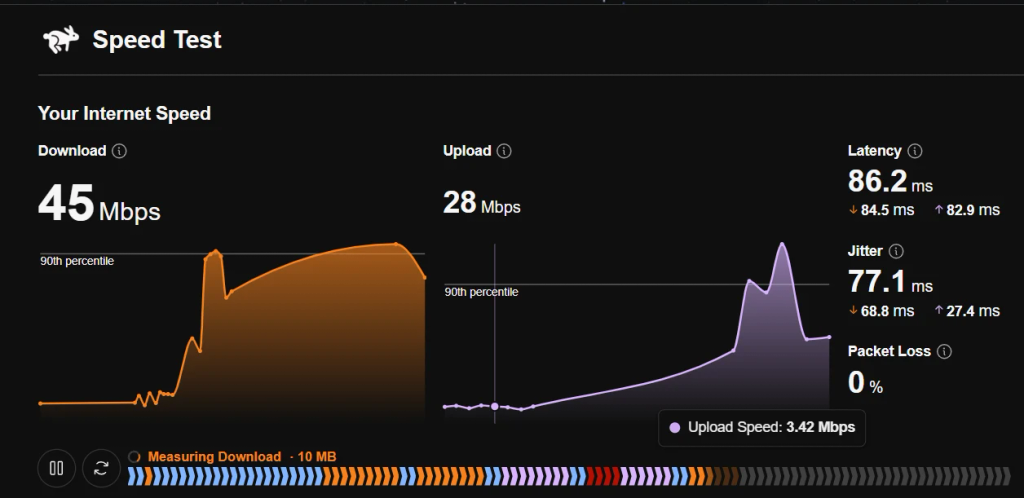
- 2. Divide by 8 to get MB/s. Internet plans are sold in megabits, but file downloads show megabytes.
- 3. Download something large from another site and watch the speed for 30 seconds.
- 4. Compare it with what TeraBox shows.
Here is what common line speeds mean for a 1 GB file, in the best case with no overhead (1 GB = 1,024 MB):
| Your line speed | In MB/s | Best-case time for 1 GB |
|---|---|---|
| 25 Mbps | about 3.1 MB/s | about 5.5 minutes |
| 50 Mbps | about 6.25 MB/s | about 2.7 minutes |
| 100 Mbps | about 12.5 MB/s | about 1.4 minutes |
| 300 Mbps | about 37.5 MB/s | about 27 seconds |
Now compare that with a TeraBox transfer sitting at 300 KB/s. That is only about 2.4 Mbps, roughly 2% of a 100 Mbps line, and a 1 GB file would take close to an hour. A gap that wide cannot come from Wi-Fi quality.

If the other site runs near your plan speed and TeraBox sits at a few hundred KB/s, the limit is on TeraBox’s route. If both are slow, start with your own connection. The plan-level figures are in our guide to TeraBox free vs Premium limits.
Step 2: Match the pattern
| What you see | Likely cause | What to do |
|---|---|---|
| Slow from the first second, steady low number | Free-tier speed limit on TeraBox’s side | Waiting or restarting won’t change it; see “When you only need a shared file” below |
| Starts fast, then drops | Server load, crowded Wi-Fi or weak mobile signal | Retry at a quieter hour, or switch between Wi-Fi and mobile data |
| Freezes at or near 99% | Connection dropped near the end, or the phone paused the transfer | Pause and resume, or fetch the link again; check free storage |
| Restarts from zero after a break | The browser or app can’t resume | For big files, use a download manager with resume support |
| A folder takes forever | Many separate files | Save only the files you need |
| The status reads “Remuxing” at the end of a video save | The downloader is packing the fetched pieces into one video file | Normal; it took about 5 seconds in our test | The video is rebuilt from TeraBox’s streamed segments first | Normal for video links; give it a moment |
| File finishes but won’t open | Unusual codec, missing archive tool, or an incomplete file | Try VLC for video, an archive tool for .rar, and re-fetch if it still fails |
Why downloads stall near the end
The progress bar counts bytes received, and the last stretch is where a dropped connection hurts most. A large file gives the connection more chances to break, and a restart can mean re-establishing the whole transfer. Phones add their own causes: the screen locks, battery saver pauses the browser, or storage runs out while the file is being written. Security software scanning the file as it is saved can also make the end look frozen. These are general reasons, not a TeraBox-specific bug. For files saved through our tool, most interruptions turn out to be a transient network issue rather than a problem with the file itself.
Fixes that actually help
- Retry the link. Paste it again, click Download, then Save. A fresh request often clears a stall.
- Switch networks. Try a mobile hotspot instead of home Wi-Fi. If speed jumps, your ISP’s route was the issue.
- Fix the basics. Use a wired connection or the 5 GHz band, and pause cloud backups and app updates.
- Keep the phone awake. Stay on the page, turn off battery saver for the browser, and leave enough free storage for the whole file.
- Test with your VPN off. A VPN can add a detour. If your ISP routes poorly, a nearby VPN server sometimes helps, so treat it as an experiment, not a fix.
- Use a download manager for very large files. Resume support stops a dropped connection from sending you back to zero.
- Take only what you need from a folder. Each file is its own entry, so skip the rest.
What doesn’t help
- Clearing cache or reinstalling the app. A limit applied on TeraBox’s servers doesn’t live in your cache.
- A faster internet plan. If TeraBox hands you 2.4 Mbps worth of speed, a gigabit line won’t change that.
- “Speed booster” apps and modded APKs. These are a good way to hand your phone or login to a stranger.
When you only need a shared file
If someone sent you a public share link, you don’t need TeraBox’s page or app at all. Our TeraBox downloader requests the file directly instead of loading TeraBox’s throttled web player first, so no account or app install is needed. For video links it fetches TeraBox’s streamed segments in parallel and rebuilds them into one MP4 without re-encoding. We can’t promise a set speed, because the file still comes from TeraBox’s servers. It also has limits you should know:
- It can’t open links locked with an extraction code, because there is no field to enter one. Open those in the TeraBox app with the sender’s code.
- It can’t reach private files that were never shared, or files that were deleted or have expired.
- Use it only for files you own or have permission to save.
What we saw when we saved the same file through our tool
To see how this plays out on a real file, we saved the same 1.41 GB video (1,439.10 MB) through our TeraBox downloader on the same connection. TeraBox’s own transfer list had shown 49.39 KB/s with an estimated 8 hours 13 minutes still to go. In our downloader, the progress counter read 15 of 964 pieces at 4:39 PM, and by 4:41 PM it had finished fetching and moved to its last step, remuxing, which took about 5 seconds. Our on-screen clock shows only minutes, so we can only bound the total: the whole save took about 3 minutes or less, an average of at least roughly 7.5 MB/s.

Treat this as one test of our Terabox video downloader on one file and one connection, not a promise. Speeds change with the file, the time of day and TeraBox’s servers.
| TeraBox transfer list | TeraBox downloader | |
|---|---|---|
| File | Same 1.41 GB video (1,439.10 MB) | Same file |
| Speed | 49.39 KB/s | At least about 7.5 MB/s (estimated) |
| Time to finish | About 8 h 13 min (TeraBox’s own estimate) | About 3 minutes or less |
| Tested on | November 20, 2026 | November 20, 2026 |
FAQ
Most often because free TeraBox transfers are speed-limited, so the cap sits on TeraBox’s side and not on your line. A speed test against another site shows which it is.
Usually the connection dropped near the end, or the phone paused the transfer. Pause and resume, or fetch the link again.
Not if the limit is on TeraBox’s side. A 300 KB/s transfer uses about 2% of a 100 Mbps line, and a bigger plan won’t change that.
Re-paste the link, click Download and Save again. For very large files, a download manager with resume support helps.
It can help if your ISP routes poorly to TeraBox, and it can slow things down if it adds a detour. Test with it on and off.
No. Public links work without an account or app install.
It is the last step: the downloader packs the video pieces it fetched into one video file without re-encoding. In our test it took about 5 seconds.
The bottom line
Run the three-minute check first. If TeraBox is slow and everything else is fast, the limit is on TeraBox’s side and no router tweak will fix it. If the transfer freezes midway, treat it as a connection problem and retry. For one file from a public link, skip TeraBox’s page and use the downloader.