
A Kick clip is a short highlight of 10 to 180 seconds. A VOD is the full recording of a past stream. You can cut a clip from a live stream or from a VOD, but a VOD itself disappears after 7 days on a regular channel and after 30 days on a verified one.
That one difference changes how you should use each. Clips are for sharing a single moment. VODs are for rewatching the whole stream, and they run on a timer. Below is a side by side comparison, what Kick’s own help pages say, and how to pick the right one.
Kick Clips vs VODs at a Glance
| Kick clip | Kick VOD | |
|---|---|---|
| What it is | A short video cut from a stream | The full recording of a past stream |
| Length | 10 to 180 seconds | As long as the stream |
| Made by | Any logged-in viewer or the streamer | Saved automatically after a stream ends |
| Comes from | A livestream or a VOD | The livestream itself |
| How long it stays | Kick’s help pages give no expiry date | 7 days (regular channel) or 30 days (verified channel) |
| Count limit | None stated by Kick | 16 replays (regular) or 30 replays (verified) |
| Who can remove it | The channel owner | The streamer can delete it or make it private |
Sources: Kick Help Center, How to create clips on KICK (page dated June 15, 2026) and KICK VODs (stream replays) (page dated May 21, 2026). Date checked: 26 October 2026.
What Is a Kick Clip?
A Kick clip is a short video that captures one moment. According to Kick, clips run from 10 to 180 seconds, and the 180 second maximum is the same on desktop and mobile.
Anyone who is logged in can make one, as long as they are not banned from the streamer’s chat. While watching, you click the clip icon or press the C key, move the slider to set the length, add a title and publish. After you publish one clip, Kick makes you wait 60 seconds before you can make another.
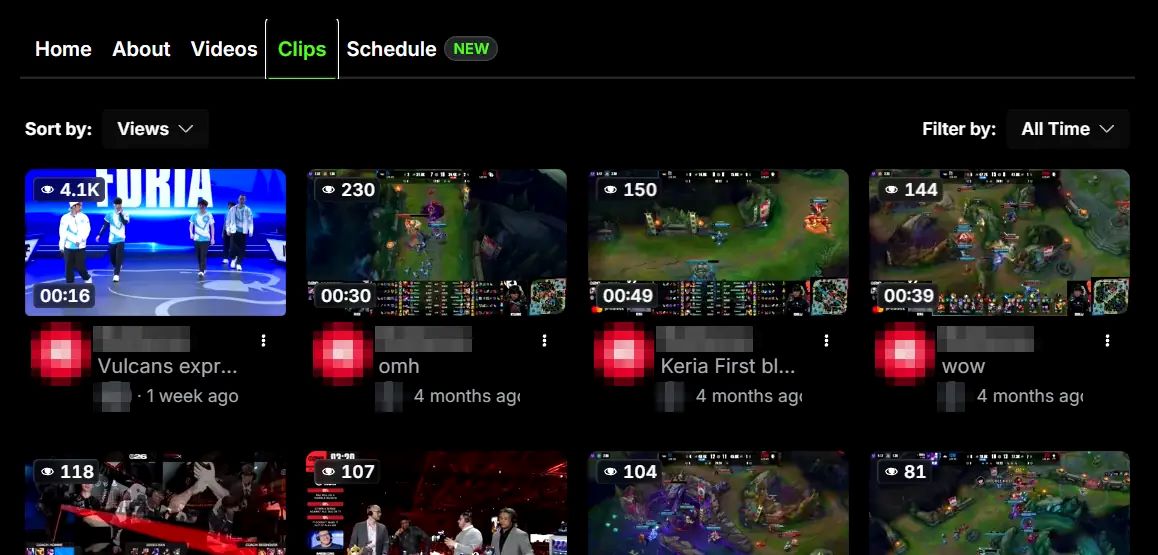
Streamers can also switch clipping off for their whole channel. When that happens, no viewer can clip that stream. Kick also notes that a new clip can take a few minutes to process before it shows up in your clip library.
One small detail is easy to miss. After you publish, Kick offers a button to send the clip to the streamer’s chat, but the page says this option is not available when you clip a VOD.
What Is a Kick VOD?
VOD stands for video on demand. On Kick, a VOD is also called a stream replay. When a stream ends, the full recording is saved to the channel so people can watch it later.
The catch is time. Kick says verified streamers can keep replays for up to 30 days after the stream ends, and non-verified streamers keep them for 7 days. There is also a cap on how many replays a channel can hold at once: 30 for verified channels and 16 for non-verified ones.
Streamers can remove a VOD or set it to private from the Videos tab on their channel page.
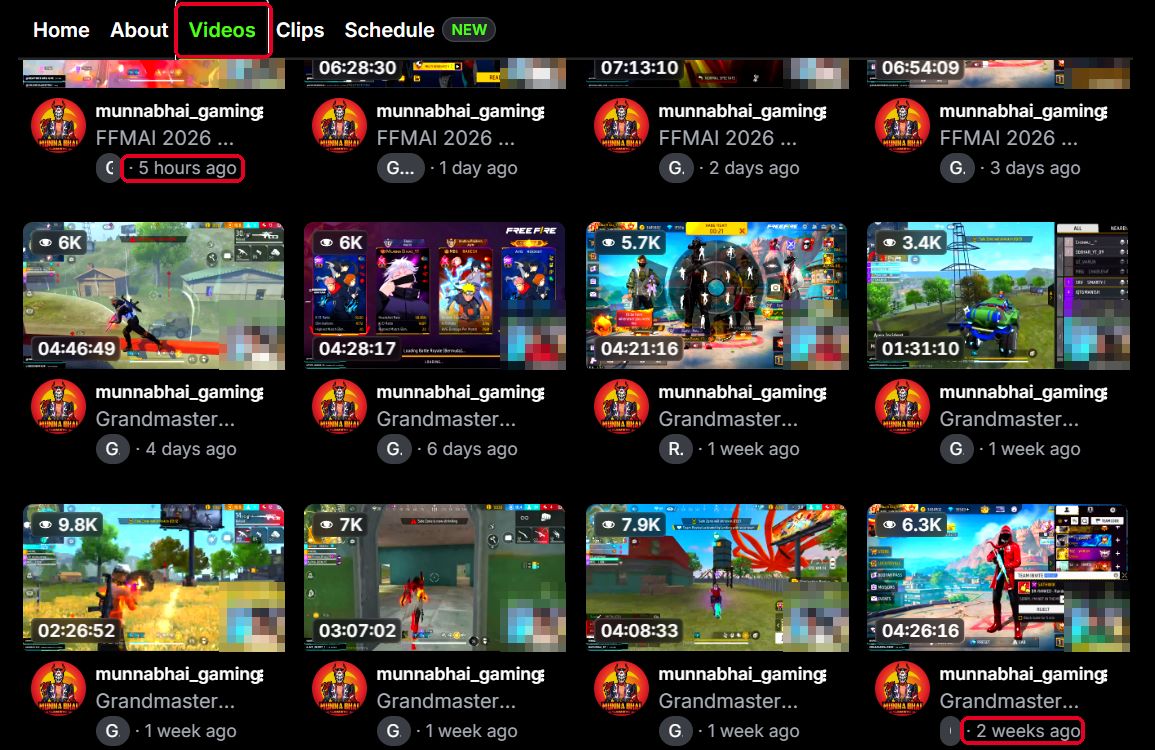
On a channel page, past streams sit under the Videos tab, and clips sit right next to it under the Clips tab. On the channel we checked, the Videos tab lists 12 replays. The newest is labelled 5 hours ago and the oldest 2 weeks ago. The shortest replay runs 1 hour 31 minutes and the longest 7 hours 13 minutes, while a clip stops at 3 minutes.
How Clips and VODs Work Together
The two are not rivals. A VOD is the raw material, and a clip is a slice of it. Kick’s clip guide says you can make a clip from a livestream or from a VOD, and the VOD guide repeats it.
There is a wrinkle, though. Kick’s troubleshooting page, which is older than both, lists “the streamer is not currently live” as a reason you cannot clip and says you can usually only clip from a live stream. Kick’s own pages do not fully agree with each other, so the clip icon on the Video page itself is the quickest way to check.
Also Read: How Long Do Kick VODs Last? 7 vs 30 Days
Common Mix-Ups and Quick Fixes
- The clip shows the wrong moment – Kick says a clip captures a fixed amount of stream time before and after the moment you click, so the exact second can fall just outside the window. You can trim the start and end after you create it.
- The clip has not appeared – New Kick clips can take a few minutes to process. Check your Kick clip library before you try again.
- The Video is gone – Check the channel type first. Regular channels keep replays for 7 days, and a streamer can delete a VOD or set it to private at any time.
Which One Should You Use?
Pick a clip – when you want to share one moment, post a highlight on social media, or send a quick link to a friend. A clip is short, easy to open and does not need anyone to sit through the whole stream.
Pick the VOD – when context matters. If you want to see how a moment started, read the chat reaction or rewatch a long event, the clip will not be enough.
Watch the clock on VODs – Because replays last only 7 or 30 days, a moment you care about is safer as a clip. A clip is also easier to share, because it opens from a single link.
Saving a copy before time runs out
Kick lets you save any clip you can open as an .mp4 file from the clip page. If you need a copy of a public Kick clip and want to fetch it from its link, a kick clip downloader can do that. Only save content you made yourself or have permission to keep.
Frequently Asked Questions
According to Kick’s clip guide and VOD guide, yes. Kick’s troubleshooting page says you can usually only clip from a live stream, so the pages disagree. The clip icon on the VOD page is the quickest way to confirm it for a given channel.
Between 10 and 180 seconds. The 180 second maximum applies on both desktop and mobile, and you can shorten the clip with the slider before you publish.
7 days on a non-verified channel and up to 30 days on a verified channel. A channel can also hold only 16 replays (non-verified) or 30 replays (verified) at one time.
Kick lists a few causes: clipping is turned off on that channel, you are not logged in, the stream only just started, or you are banned from the streamer’s chat. There is also a 60 second wait after each clip.
Kick’s help pages do not say. They give an expiry for VODs but none for clips. Because that is not documented, keep your own copy of any clip you cannot afford to lose.