Snapchat Spotlight works in four stages: Snapchat reviews every video, checks it against its recommendation rules, ranks it separately for each viewer, and only then, for invited creators, shares ad revenue from it. A video can be stopped at any stage, which is why posting to Spotlight doesn’t guarantee views, and why most creators never see a payout.
This guide walks through each stage using Snapchat’s own help and policy pages, last checked on 24 November 2026. It also covers what Snap changed this year that most guides haven’t caught up with, including the decision to stop recommending wholly AI-generated videos. Where Snapchat doesn’t publish a detail, we say so instead of guessing.
The four gates a Spotlight video passes through
| Gate | What happens | Who decides |
|---|---|---|
| 1. Review | The video is checked before it gets any distribution | Automated checks, then human moderators |
| 2. Eligibility | The video is tested against Snap’s rules for being recommended to non-followers | Snap’s Content Guidelines for Recommendation Eligibility |
| 3. Ranking | The video is scored for each viewer separately | Snap’s ranking algorithms, based on that viewer’s behavior |
| 4. Payout | Invited creators share ad revenue from eligible videos | Snap’s Monetization Program |
Most confusion about Spotlight comes from treating these as one step. A video can pass review and still never be recommended, and a video can be recommended widely and still earn nothing because the creator isn’t in the monetization program.
Gate 1: Every video is reviewed first
A Spotlight video isn’t shown to the world the moment it’s posted. Snapchat’s help page on moderation of Stories and Spotlight says a Snap posted to Spotlight must be reviewed before it’s allowed distribution, using a mix of machine and human moderation. Snap says the review can be quick or slow depending on the video.
Snap’s transparency pages describe the order: automated checks come first, and a human moderator looks at the Snap before it can be recommended to a large audience.
Some creators then see a “limited distribution” label. Snap says it means some or all non-followers won’t be shown the video because it doesn’t meet the recommendation guidelines. The video isn’t necessarily deleted, it just isn’t being pushed. These statuses appear in the Snapchat app and in Story Studio.
Gate 2: Eligibility to be recommended
Passing review isn’t the same as being recommended. Snap’s Content Guidelines for Recommendation Eligibility apply stricter standards to anything shown beyond a creator’s friends or subscribers, and Spotlight is one of those places. The points that cost everyday creators the most reach are:
- Poor video quality: blurry or pixelated footage, wrong orientation that forces a viewer to rotate their phone, letterboxed video, or missing audio.
- Unoriginal content: posting something you didn’t create and haven’t transformed with commentary or a reaction, including low-effort reaction clips that exist only to repost someone else’s video.
- Flashing or strobing effects without a warning for photosensitive viewers.
- Links out of the app: URLs or QR codes pointing to other messaging apps, social platforms or cloud storage.
- Promoting accounts on other platforms, such as a username paired with another app’s logo, unless the video credits the original creator and adds original commentary.
The newest rule is about AI. On 31 July 2026, Snap announced that wholly AI-generated videos are no longer eligible for recommendation on Spotlight. Videos enhanced or edited with Snapchat’s own AI creative tools stay eligible and carry transparency indicators. Snap also admits that no detection system is perfect. Several outlets reported that the change ends rewards for such videos too, but Snap’s own post speaks only about recommendation.
If an account repeatedly breaks these guidelines, Snap says it may reduce that account’s reach.
Gate 3: How Snapchat ranks a Spotlight for each viewer
There is no single Spotlight leaderboard. Snapchat ranks content one viewer at a time, and its help page on how content is ranked on Spotlight explains how.
First, every submission gets labeled by people and software, so a clip of puppies chasing a ball might be tagged as puppies playing with a ball outside. Snap also picks up on words used in a video’s text, which is why an accurate caption and topic help.
Then Snapchat predicts how likely a given viewer is to favorite or share the video, and how long they’ll probably watch. Those predictions become a score, and the feed is ordered by score with adjustments for variety. The signals Snap says tend to matter most are:
- The viewer’s country, language, age and gender, so content is local and age-appropriate.
- Creators and content similar to what the viewer has watched, favorited, subscribed to, shared or commented on.
- The video’s category and details such as watch length, creator, location, language and hashtags.
- Negative signals: anything the viewer hides or reports, and videos they skip.
Smaller factors include the viewer’s device and network type and whether friends engaged with something. Snap also treats finishing a video as a good sign.
One detail stands out: a creator’s follower count isn’t on Snap’s list of ranking indicators. Snap also mixes in variety on purpose, so a viewer who watches a lot of basketball still sees other things.
In the European Economic Area, the UK and Switzerland, viewers can turn off personalized recommendations in Spotlight or reset their suggested content. With personalization off, the feed relies on basics like language, age and country and feels more random.
Gate 4: How Spotlight payouts work now
Spotlight pays through Snapchat’s Monetization Program, which is invitation only. You can’t apply. Snap says it reviews creators regularly and emails the ones it invites, and that it never charges for an invitation. Anyone promising an invite for money isn’t connected to Snap.
| Requirement | Current rule on Snap’s help page |
|---|---|
| Followers | At least 50,000 |
| View time | 15,000 hours over the last 28 days, with at least 3,000 from Spotlight |
| Age | 18 or older, or the age of legal majority locally |
| Content | Original, advertiser-friendly, following the Community Guidelines and the recommendation guidelines |
| Location and status | An eligible country, and a verified Snap Star |
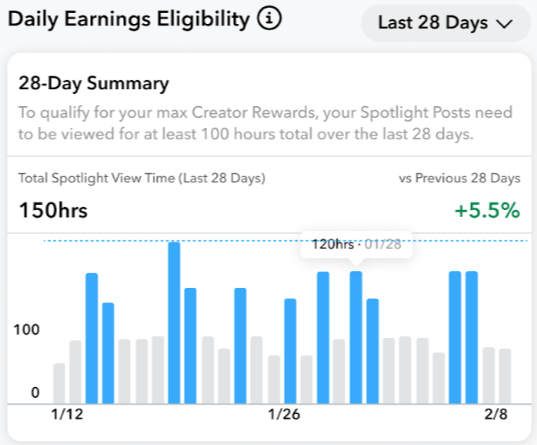
| Ongoing condition | Since 7 May 2026, at least 100 hours of Total Spotlight View Time over the last 28 days for maximum rewards |
| Video length | A Spotlight video must be at least 30 seconds long to earn revenue |
| Cash-out | Minimum $100, once fully onboarded for payouts |
Meeting every line doesn’t guarantee an invite. It only makes you eligible to be considered. You can track the 100-hour figure in the app under Daily Rewards Eligibility at the top of Insights.
The money comes from ads. Snapchat places ads between Snaps in a Public Story or within a Spotlight, and creators in the program receive a share of that revenue. Snap says ads are served mainly based on how long people spend watching. This program replaced the older Spotlight Rewards Program when Snap merged Stories and Spotlight into one unified system on 1 February 2025.
What changed recently
| Date | Change | Source |
|---|---|---|
| 4 Nov 2026 | Snap reports people posting to Spotlight up 130% and daily active viewers up 40% year over year | Snap’s Q3 earnings call, as reported by Nasdaq |
| 31 Jul 2026 | Wholly AI-generated videos are no longer eligible for Spotlight recommendation | Snap newsroom |
| 7 May 2026 | 100-hour Spotlight view-time condition added for maximum creator rewards | Snap help page |
| 1 Feb 2025 | Unified Monetization Program replaces separate Spotlight rewards | Snap newsroom |
What Snapchat doesn’t publish
A lot of Spotlight advice online states guesses as facts. Here is where Snap’s own pages stop.
| What you’ll read online | What Snap actually says |
|---|---|
| “Spotlight pays X per 1,000 views” | Snap publishes no per-view rate. Third-party guides we checked give figures ranging from cents to several dollars per 1,000 views, which shows they’re estimates. |
| “Spotlight tests every video on a small group first” | Nothing in Snap’s ranking or moderation pages describes a test-group stage. Treat it as a creator theory. |
| “Follower count boosts your Spotlight reach” | Follower count isn’t in the ranking indicators Snap lists. |
| “Spotlight must be over one minute to earn” | Snap’s December 2024 announcement said longer than one minute, but its help page today says at least 30 seconds. Use the live page. |
| “Snap catches every AI video” | Snap itself says no detection system is perfect. |
Why a Spotlight can be limited or removed
When a video stops getting views or disappears, it’s usually one of four things.
Limited distribution. The video is still up, but Snap won’t recommend it to some or all non-followers. This is the mildest outcome and the most common.
Removal for breaking the rules. Snap’s Community Guidelines prohibit things like sexually explicit content, violence or dangerous behavior, illegal activity and false information on Discover and Spotlight. Content that violates them can be taken down, and the account can get an enforcement.
Removal under local law. If a report shows content is illegal under the poster’s local law, Snap says it will remove it or take other appropriate action.
You deleted it. A Spotlight you removed yourself won’t come back on its own.
If you think a decision was wrong, you can appeal. Snap says Spotlights can currently be appealed directly in the app. Under Snap’s appeal process, go to Settings, then Account Status, where enforcements you can appeal are marked “Tap to Appeal.” A successful appeal on a restricted video makes it eligible for recommendation again, and in some places, including the EU and UK, a deleted Spotlight can be restored. Snap emails the outcome.
If the video was limited for something fixable, like poor quality, an outside link or missing sound, correct that and post a fresh version. Sometimes the edited Snap exists only inside Spotlight, and in that case a file saved through the snapchat spotlight downloader gives you something to re-edit while the video is still up. If it was flagged as unoriginal, or as wholly AI-generated, reposting the same clip won’t change the outcome.
Frequently asked questions
Snapchat reviews each Spotlight video, checks it against its recommendation rules, then ranks it separately for every viewer based on what that person watches, favorites, shares and skips. Invited creators can also earn a share of ad revenue.
Only partly. Since 31 July 2026, wholly AI-generated videos are no longer eligible for recommendation on Spotlight. Videos enhanced or edited with Snapchat’s own AI creative tools stay eligible and carry transparency indicators.
Through Snapchat’s invitation-only Monetization Program, which shares revenue from ads placed within Spotlight videos and between Snaps in Public Stories. Creators need at least 50,000 followers, 15,000 hours of view time in 28 days (3,000 from Spotlight) and Snap Star status, among other requirements.
Snap doesn’t publish a rate. Ads are served mainly based on watch time, so earnings depend on the audience, the ads shown and how long people watch.
It may still be in review, it may have limited distribution for missing the recommendation rules, or the ranking simply didn’t match it with many viewers. Check for a limited distribution notice first, since that’s the one you can act on.
Yes. Spotlights can be appealed in the app under Settings and Account Status, and Snap emails you the result.
No. Snap ranks Spotlight for each viewer using their location, language, age, viewing history and interactions, with some variety mixed in.
The takeaway
Spotlight is less mysterious once you see the gates: review, eligibility, ranking, then payout. Most of the problems creators run into sit at the second gate, and the newest rule there is the one about wholly AI-generated videos. Snap is also growing the Spotlight audience quickly, so competition for attention keeps rising. And if you ever need to save something other than a Spotlight, like a Story or a profile picture, the Snapchat downloader page is where those tools live.