The easiest way to share a large file stored on TeraBox is to send the share link, then let the receiver paste it into a browser-based tool like the getindevice TeraBox downloader. They click Download, then either stream the video right on the page or download it. There’s no app to install, no account to create and no login. It works on a PC, laptop, iPhone or Android phone.
This guide covers both sides of the process with real screenshots: how to create and send the link, and how the receiver opens it and saves the file. It also explains how to keep a public link under control, so convenience doesn’t cost you more privacy than you intended.
Key Takeaways
- Sending a TeraBox link is only half the job. The receiver’s experience decides whether the file actually arrives.
- Opening a share link in a phone browser often pushes people towards the app, and free-tier speeds are commonly reported to be throttled.
- The getindevice TeraBox downloader turns a public share link into a file the receiver can stream or download, with no account or app.
- The file isn’t re-encoded or re-compressed, so a video is saved at the resolution and bitrate it was uploaded at.
- The tool handles videos, photos, ZIP and RAR archives, PDFs, APKs and whole shared folders.
- Public links should be handled with care: share a single file, send it only to the people who need it, and delete the share when you’re done.
- Sensitive documents like ID scans or bank papers shouldn’t go through any share link.
Why Sending a TeraBox Link Isn’t Enough
Imagine you’ve uploaded a 3 GB wedding video to TeraBox and sent the link to your family. A few minutes later the messages start: “It’s asking me to install an app.” “It wants me to log in.” “It’s so slow, it says 2 hours.”
That’s the usual story. TeraBox’s own page tends to push an app install, an account or a wait behind a throttled connection first, especially when the link is opened in a phone browser. Independent reports consistently describe free-tier download speeds as well below a typical home connection, particularly on multi-gigabyte files.
None of that is about your file. The file is fine and the link works. The friction sits between the link and the receiver, and that’s exactly the gap a downloader closes.
What the getindevice TeraBox Downloader Does
The tool takes a public TeraBox share link and hands back the actual file, instead of TeraBox’s own page. Here’s what that looks like in practice.
No App and No Account for the Receiver
It works directly against TeraBox’s public share infrastructure, so there’s nothing to sign up for, log into or install. A person who has never used TeraBox can still open your file. That’s the point of the whole process.
Stream or Download, Your Choice
For video links, the receiver can stream the video right on the page or download it to the device. Streaming is handy for checking it’s the right video, or for simply watching it without saving anything.
Files Saved Without Re-Compression
Nothing is re-encoded or re-compressed along the way. A video comes back at the exact resolution and bitrate it was uploaded at, saved as a standard MP4. This matters for a wedding video or a course recording. We explain the broader question in our guide on whether video downloaders reduce quality.
More Than Just Videos
Most TeraBox downloaders only handle video. This one also fetches photos at full original resolution (saved as JPG), ZIP and RAR archives, PDFs and APK installers, each labelled with its real file type.
Whole Folders, Handled File by File
A shared folder link returns every file inside as its own entry, each with its own Save button, instead of one bundled download.
Every Link Format and Mirror Domain
Links from terabox.com, 1024terabox.com and older mirror domains like nephobox.com or dubox.com all resolve the same way. Both the short /s/ format and the older sharing/link?surl= format work, so the receiver never has to clean up the link first.
How to Share a Large File: The Sender’s Side
The sender needs a TeraBox account to upload the file and create the link. This part takes only a few minutes.
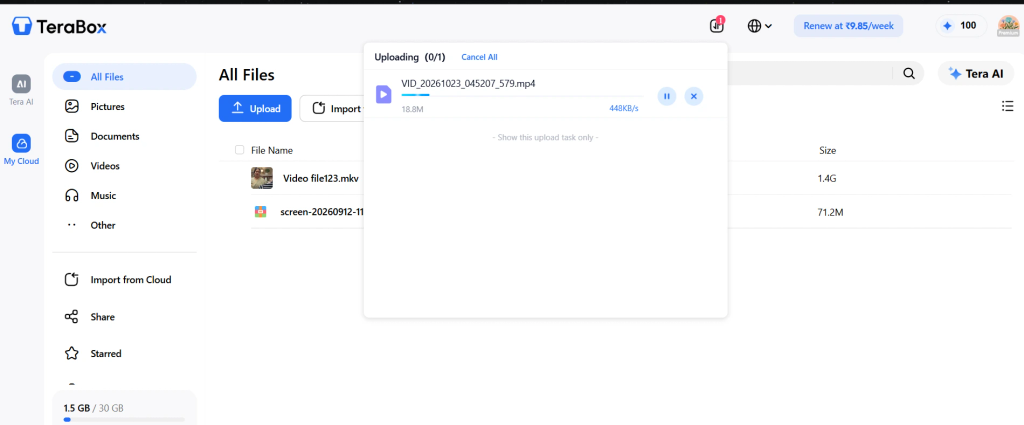
Step 1: Upload the File to TeraBox
Open TeraBox on your phone or the web and upload the file. Stay on Wi-Fi and keep the app open until the upload finishes, because large videos take a while.
Step 2: Copy the Public Share Link
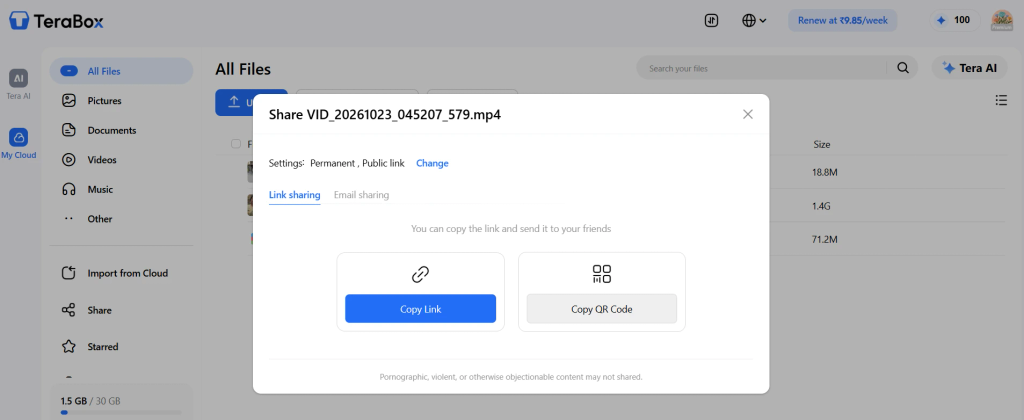
Once the upload is done, select the file, tap Share and copy the link. If the app offers an extraction code, leave it off so the link opens for anyone.
Step 3: Share the Link
Now send the link to whoever needs the file, on WhatsApp, Telegram or any other app you use. For private content, send it one-to-one or in a small group rather than a big public one, since a public link goes wherever the receiver sends it next.
How the Receiver Opens and Saves the File
This is the part most sharing guides skip, and it’s where the process either feels effortless or falls apart.
Step 4: Paste the Link Into the Downloader
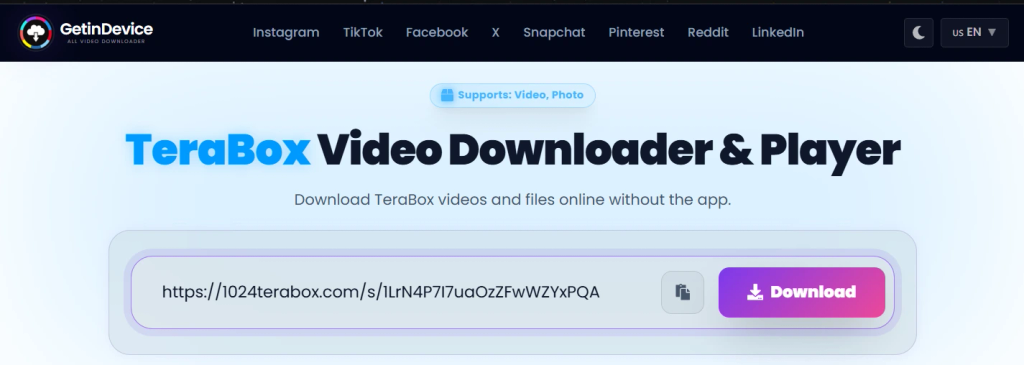
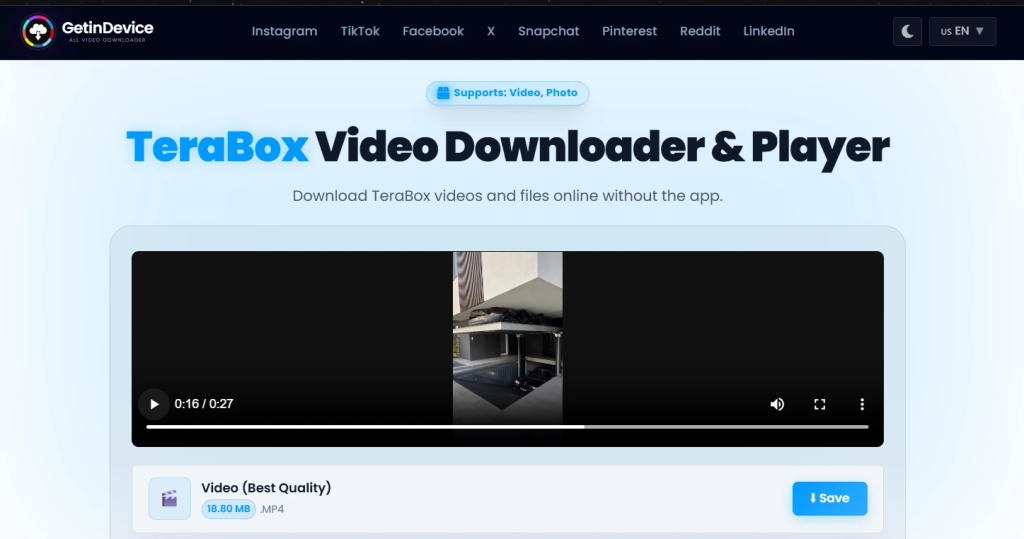
The receiver copies the link, opens the TeraBox downloader in any browser, pastes it into the box and clicks Download.
Step 5: Stream or Download
For a video, the receiver can stream it right on the page or click Save to download it.
Saving on Each Device
On a PC or Laptop
Paste the link, click Download, then stream the video or click Save next to the file. It works the same on Windows and Mac, in any browser.
On an iPhone
Open the page in Safari, paste the link and tap Download, then stream the video or tap Save. Saved videos land in Safari’s download manager first, and Apple explains where to find downloads on an iPhone if you can’t spot the file.
On an Android Phone
Open the page in Chrome or another mobile browser, paste the link, tap Download, then stream the video or tap Save. Saved videos and photos land in the Download folder and appear in the Gallery. Android users who download from many platforms can also use the getindevice Android app, which keeps all the downloaders in one place.
What Can You Send This Way?
A TeraBox link carries whatever you upload, and the downloader returns each file with its real type.
- Videos and photos: family footage, event videos, tutorials, full-resolution photos
- Documents and archives: PDFs, ZIP and RAR files, project deliveries for a client
- Whole folders: each file listed separately, with its own Save button
- Android installers: APK files, which only install on Android devices and never on iPhone
Real-World Examples
This process fits a lot of everyday situations. A wedding or family video, which a chat app would compress, can go to the whole family group as one link, and each person streams it or saves it on their own phone, whatever device they use. Teachers can send one link per lesson to a small student group, and students can stream or download it without creating a TeraBox account. Freelance editors and designers can hand finished files to a client without asking them to sign up for anything: send the link, ask them to paste it into the downloader, and delete the share once they confirm they have the file.
The same method works for a trip photo folder, where each photo appears as its own entry and is saved at its original resolution. If a link may expire soon, saving the file to your own device gives you a stable copy, which is a habit worth having when the link was created without the uploader being logged in.
How to Keep a Public TeraBox Link Under Control
A public link trades a little privacy for a lot of convenience. These habits keep that trade sensible.
Share a Single File, Not a Whole Folder
A folder link points at the folder, so it usually shows whatever is inside, including files you add later and forget about. For a one-off send, share just the file.
Choose Who Gets the Link
A public link works for anyone who holds it, and links get forwarded, screenshotted and pasted into groups you’ve never seen. Send it only to the people who need it.
Delete the Share When You’re Done
A link stays active until it expires or you cancel it. Once the receiver has the file, cancel the share or delete the file from your TeraBox. Deleting the original makes the link stop working for everyone, which is also your emergency brake if a link ends up somewhere it shouldn’t.
Know What You Can’t Take Back
Expiry and deletion stop new people from opening the link, but they don’t remove a copy someone has already saved. Treat every public link as something that can be copied and forwarded.
Keep Sensitive Documents Off Share Links
For ID cards, bank statements or medical papers, a share link isn’t the right tool. If you have to send something like that, put it in an encrypted archive first, such as a password-protected ZIP with AES encryption, and share the archive password through a different channel.
What About Private Links?
TeraBox also lets uploaders protect a share with a short extraction code, a four-character password, and choose how long a link stays active. The code is useful when a file needs extra protection, but it adds steps: the receiver needs the code as well as the link, and has to enter it before the file opens. For everyday sharing, like a family video or a tutorial, a public link is the quicker route. If you do use a code, send it through a different channel than the link.
Why Does a TeraBox Link Stop Working?
If the receiver says the link doesn’t open, one of these usually explains it. Our guide on TeraBox links not opening goes deeper on fixes.
The Link Expired
A link stops working once its validity runs out. Links created while the uploader wasn’t logged in can expire in as little as 24 hours. Create a fresh link from inside your account.
The File Was Deleted or Removed
If the original file is deleted, or TeraBox removes it, the link stops working and no downloader can recover it. Check that the file is still in your TeraBox, then share it again.
The Link Was Copied Incorrectly
A cut-off link is a common cause. Copy the full URL again and paste it fresh into the downloader.
The Download Stopped Partway
This happens more often with very large files. Paste the link again, click Download, and try Save once more. Most interruptions are a temporary network issue rather than a problem with the file.
Is It Safe to Use a Downloader for a TeraBox Link?
The tool requests the file from TeraBox’s public share infrastructure and hands it back. It never asks for a TeraBox username, password or personal account detail, and it doesn’t host, store or cache your files on its own servers. We cover the wider safety questions in our guide on whether TeraBox downloader tools are safe to use.
How to Spot a Fake TeraBox Link
A real share link leads to the file page directly. It doesn’t ask for your TeraBox password, a card number or a “verification” step before you can see the file. If a page does, close it.
Quick Checklist Before You Send a TeraBox Link
- File renamed to something clear
- Link created while logged in to your own account
- Single file shared instead of a whole folder, where possible
- Link sent only to the people who need it
- Nothing sensitive behind the link
- Receiver told to paste the link into the downloader
- Share cancelled, or file deleted, once the job is done
Frequently Asked Questions
Create a public share link from your TeraBox account, copy it and send it on WhatsApp or Telegram. The receiver pastes it into the getindevice TeraBox downloader and can stream the video or download it.
No. Public share links work without logging in, creating an account or installing the app.
Yes. Open the downloader in Safari, paste the link, tap Download, then Save. The video lands in Safari’s download manager, and the Share icon then lets you choose Save Video to move it into Photos.
No. The file isn’t re-encoded or re-compressed, so it’s saved at the same resolution and bitrate it was uploaded at.
Yes. A folder link lists every file inside as its own entry, and each one has its own Save button. For privacy, a single-file link is usually the better choice.
Videos, photos, ZIP, RAR, TAR and 7z archives, PDFs and APK installers, each labelled with its real file type.
It depends on the validity period you set. Links created while the uploader isn’t logged in can expire in as little as 24 hours, and deleting the original file ends the link straight away.
It’s an optional short password, four characters, that an uploader can attach to a share link. The receiver needs the code in addition to the link.
No. Once someone can open the link, they can save the file. Treat every link as something that can be copied.
Cancel the share or delete the file from your TeraBox straight away. Then create a new link and send it to the right person.
No. APK is an Android-only format, so iOS can’t install it, whichever tool downloaded it. On Android, you may need to allow installs from unknown sources for your browser first.
For everyday files like videos and tutorials, a link is fine when you handle it carefully. For high-risk documents like ID scans or banking papers, avoid share links, or encrypt the file yourself first.
Conclusion
Getting a large file to someone comes down to two parts: the sender creates a link, and the receiver can actually open it. The second part is where most people get stuck, and it’s where a browser-based tool makes the difference. Paste the link into the getindevice TeraBox downloader, then stream the video or download it, and it’s done, on any device.
Keep the sender side simple too. Share a single file, send it only to the right people, and delete the share when the job is done.