
A Tumblr downloader is generally safe when it runs in your browser, never asks for your Tumblr login, and never asks you to install anything. The risk comes from tools that break those three rules. A search for a Tumblr downloader online returns plenty of both kinds, and the bad ones can look almost identical to the good ones.
If you have ever copied a Tumblr link and hesitated over the button, that caution is sensible. Some pages hide the real button among fake ones. Others push extensions that ask for far more access than saving one GIF needs. This guide covers what actually goes wrong, which worries are exaggerated, and a five-point check that takes about a minute.
The Short Answer
- Usually safe: a browser-based tool that takes a public post link, needs no account, installs nothing, and starts the file save directly.
- Usually not safe: anything that asks for your Tumblr password, pushes an app or extension, chains several redirects, or promises to open private blogs.
- The file itself: videos, GIFs, images, and MP3 files do not run code. The risk lies in the path you take to get them.
- No guarantee: passing the checks below lowers your risk. It does not replace paying attention.
What Happens When You Paste a Tumblr Link
Public Tumblr posts can be viewed by anyone with the link, no account needed. A downloader relies on that. You paste the post address, the tool finds each video, GIF, image, or audio file in the post, and it gives you a way to save them. It never acts as you, so it has no reason to know who you are on Tumblr.
That fact does most of the work in judging safety. A tool that asks for your Tumblr username or password wants something it does not need, and the same goes for requests to install software or verify your device. A normal run is short: paste, wait a few seconds, see the files listed, save the ones you want.
The Real Risks
Fake Download Buttons
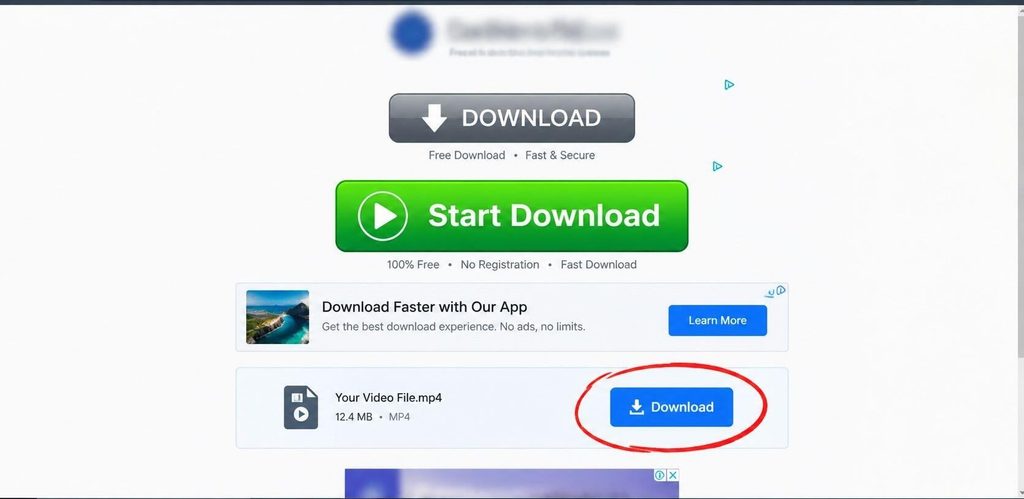
This is the most common problem. Some pages surround the real save button with ads styled to match, labelled Download Now, Start, or HD Download. Click the wrong one and you land on an unrelated site, an app store listing, or a survey. It is rarely dangerous in a technical sense, but it is built to earn from your click, and every extra click raises the odds of ending up somewhere worse.
Hover over a button before pressing it and read the address that appears in the corner of your browser. On a clean tool, the real action starts a file download or lists the file on the same page. A fake one points to a different domain. Look-alike addresses work the same way, with a small spelling change on a known tool’s name, so read the address carefully if you arrived through a search ad or a forwarded message.
Requests for Your Tumblr Login
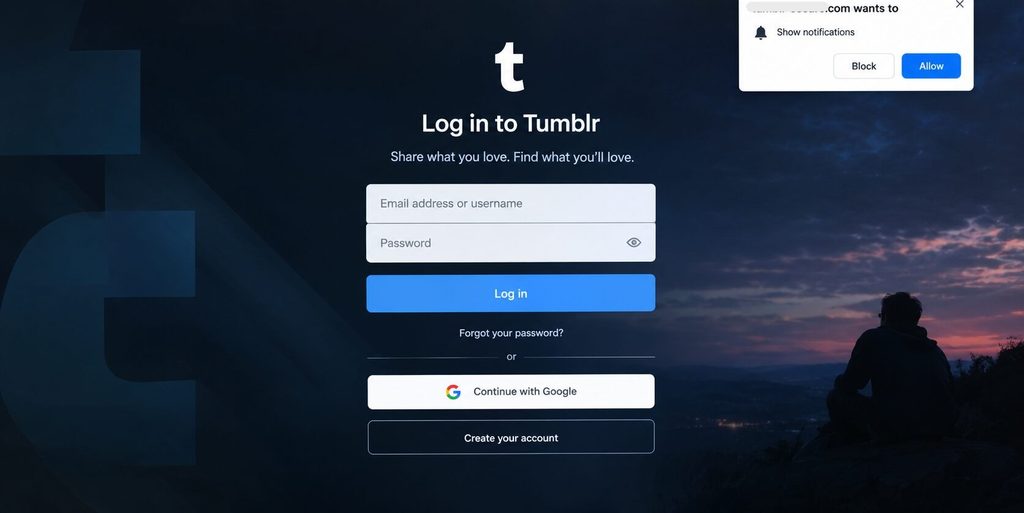
A downloader that wants you to sign in to Tumblr or approve an access request has no good reason to ask, because public posts need no credentials. A fake login page dressed up as Tumblr is a classic phishing method, and the Federal Trade Commission’s guide to phishing scams covers the same trick. Real Tumblr login pages live on tumblr.com. Anywhere else, close the tab.
Notification Prompts and Fake Virus Alerts
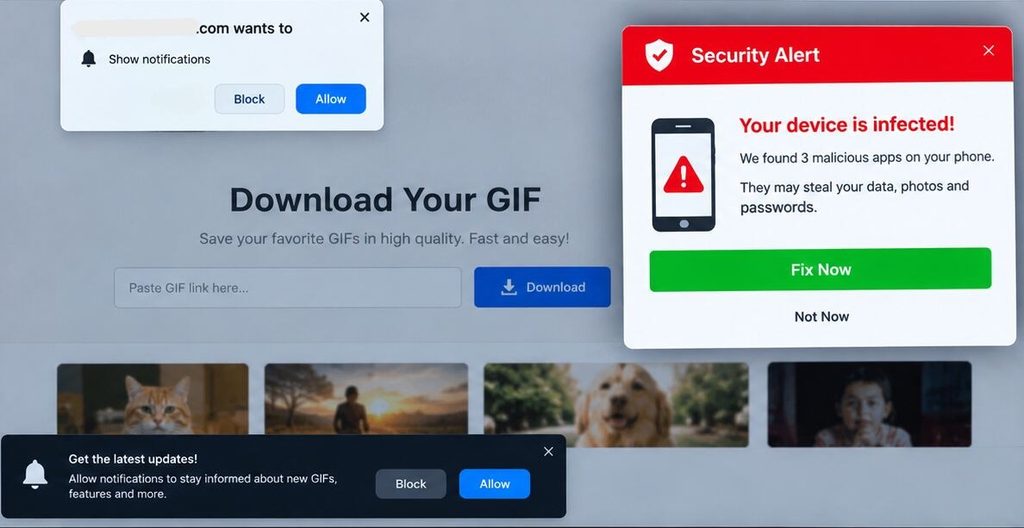
Some pages ask you to allow notifications before continuing. Saying yes lets the site send pop-ups long after you leave. Others flash a warning that your phone is infected and offer an instant fix. Neither has anything to do with saving a GIF. Choose Block and close the tab.
Private Blog Unlocker Claims
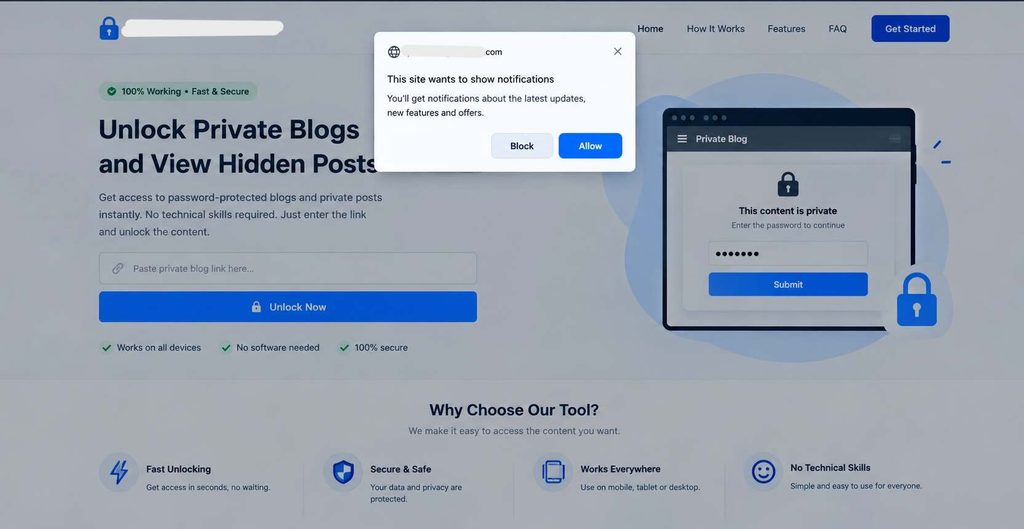
Some tools claim they can open password-protected blogs or private posts. Those are set up so only people the owner allows can see them, and a tool working from a public link has no legitimate way around that. A site promising otherwise is either exaggerating to win a click or doing something you would not want tied to your device.
Worries That Are Mostly Overstated
The media file is dangerous. MP4, GIF, image, and MP3 files do not execute code the way an installer does.
Pasting a link exposes me. The link points to a public post. The site sees that address and basic details such as your IP address, as every website you visit does. Its privacy policy explains how it handles them.
They will take over my Tumblr account. That takes your credentials, and a safe tool never asks for them.
The 5-Point Check Before You Trust Any Tumblr Downloader
- Does it ask you to install anything? If it does, leave. A browser tab is all this job needs.
- Does it ask for your Tumblr login? If it does, leave. Public posts never require one.
- What happens after you paste the link? The files should appear on the same page within a few seconds. Getting bounced to other tabs first is a bad sign.
- Which button is real? Hover before you click and read the address. If you cannot tell the real button from the ads, try another site.
- What did you actually receive? A Tumblr post produces MP4 video, GIF animations, full-size images (usually JPG or PNG), or MP3 audio. Anything ending in APK, EXE, MSI, DMG, BAT, ZIP, or RAR does not belong. Size gives clues too: a short clip that arrives as a few kilobytes, or a single video file over 500 MB, deserves suspicion, because 500 MB is the cap Tumblr’s Help Center sets for uploads. On Windows, turn on file extensions in File Explorer so a name like clip.mp4.exe cannot pass itself off as a video.
One more habit helps. Look for an About page, a privacy policy, and contact details. A site that says nothing about who runs it is harder to trust.
Online Tool vs Extension vs App
Online tools are not the only way to keep a Tumblr post. A browser tab suits one-off saves, such as when you want to download Tumblr GIFs from a handful of posts without adding anything to your browser. Extensions and apps bring convenience, and they also bring access.
| Method | Strengths | Drawbacks | What the risk depends on |
| Online tool in the browser | No install, no account, works on phone and computer | Depends on a third-party site, ad quality varies, cannot open private posts | How the site behaves. Low when it passes the 5-point check |
| Browser extension | One-click button on the Tumblr page | Can request broad site access, behavior can change after an update, desktop only | The permissions it asks for and who publishes it |
| Third-party mobile app | Shortcuts and batch features | Storage and other permissions, ads, risks when installed outside official stores | The permissions it asks for and where it comes from |
| Screen recording | No third-party tool involved | Lower quality, slow, captures overlays and notifications | Low, but the results are poor |
The last column shows what each method depends on instead of a fixed rating, because products within each group vary a lot.
Our own extension. GetinDevice also publishes a Chrome extension called Video Downloader for Social Media, so it is fair to hold it to the same standard. Its Chrome Web Store listing says it needs no sign-up, collects no data, and asks for no extra permissions. The developer’s privacy section adds that user data is not sold and is not used for anything beyond the extension’s core function. Those are the developer’s own statements, so read the listing’s privacy section yourself before installing, as you would with any extension.
It also works differently from a typical extension. It does not save the file inside your browser. When you click Download Video, or copy a link and click the extension icon, it sends you to GetinDevice.com, where the video is processed and saved. The listing says this keeps the extension light. The trade-off is that you end up on the same web tool anyway, so for Tumblr posts the browser tool is the simpler route, because the extension is a general social video tool and its listing does not single out Tumblr. It is for desktop Chrome only and does not support YouTube.
You can check the reach of any extension in a few seconds. Open its details page in Chrome and read the site access setting. What separates a careful extension from a risky one is scope, meaning how many sites it can read and whether it needs to.
Pros and Cons of an Online Tumblr Downloader
Pros
- Nothing to install, so nothing lingers on your device afterward.
- No Tumblr login, which keeps your account out of the process.
- The same steps work on iPhone, Android, Windows, Mac, and Chromebook.
- Reblogs, photosets, GIFs, and audio posts are covered, not only videos.
- Free options exist, and switching to another tool takes seconds.
Cons
- You are trusting a third party, and quality differs widely from site to site.
- Ads can be intrusive, and fake buttons are common on weaker pages.
- Output is capped by what Tumblr stores. Tumblr’s Help Center says it re-compresses every upload with a 720p H.264 MP4 as the goal, and a single video can run up to 10 minutes, so 1080p and 4K are off the table.
- Private posts, password-protected blogs, deleted posts, and videos embedded from YouTube or other sites will not download.
- A tool can break when Tumblr changes something, so it makes a poor long-term archive.
If You Already Clicked Something You Regret
Most of the time nothing happened beyond a wasted click. If something did, match the fix to the situation.
You installed an app or extension. Remove it. Delete anything unfamiliar from your browser’s extensions page, or uninstall the app and review the permissions it was given.
You typed your Tumblr password into the site. Change it on tumblr.com straight away, and change it anywhere else you reused it. Then open your Tumblr account settings, find the connected apps section, and remove anything unfamiliar. Menu labels shift over time, so the wording may differ. Turn on two-factor authentication too, so a stolen password alone is not enough.
You allowed notifications. Open your browser’s site settings, find the site, and set notifications to Block.
You downloaded a strange file. Do not open it. Delete it, and run an antivirus scan if it was an installer or an archive.
How GetinDevice’s Tumblr Video Downloader Works
GetinDevice makes the Tumblr video downloader, so read this section with that in mind. It is a browser tool for saving the videos, GIFs, images, and audio from public Tumblr posts, with no Tumblr login and nothing to install. Here is the process, including what it cannot do.
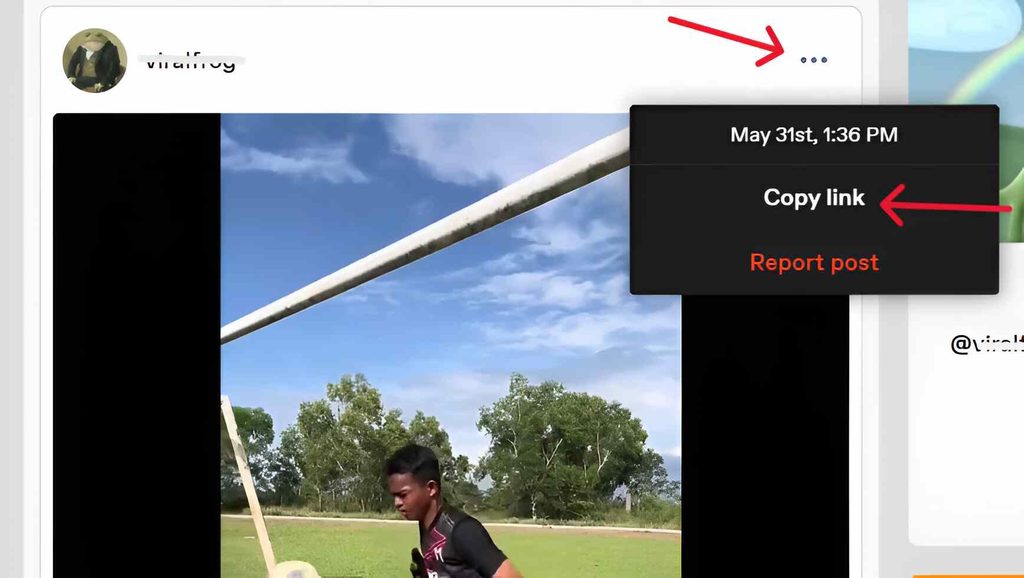
Step 1: Copy the Post Link
On Tumblr’s website, find the post, click the three-dot menu in its top corner, and choose Copy link. In the Tumblr app, tap the share icon on the post and choose Copy Link instead. You can also copy the address from your browser’s address bar. A link from a reblog works just as well as the original, because a reblog points to the same media.
The tool accepts Tumblr’s three address styles: blog-style links such as username.tumblr.com/post/123456789012/post-title, dashboard-style links such as tumblr.com/username/123456789012, and short tmblr.co links from the Share button. Two link mistakes are easy to avoid. A blog’s main page lists many posts, so open the specific post first. And if the link arrived inside a message, keep only the part that starts with https://.
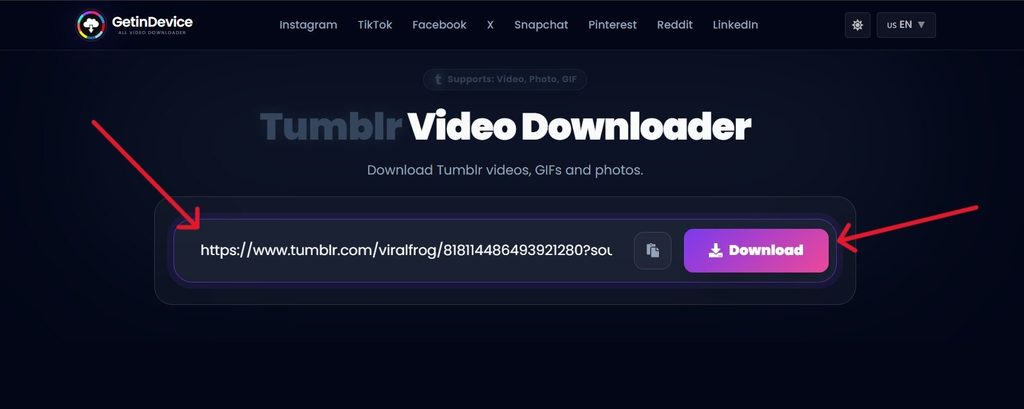
Step 2: Paste It and Tap Download
Open the GetinDevice Tumblr downloader, paste the link into the box at the top of the page, and tap Download. The tool reads the post and finds every video, GIF, image, and audio file in it. This is where the third point of the 5-point check applies: your files should be listed on the same page, without a detour through other tabs.
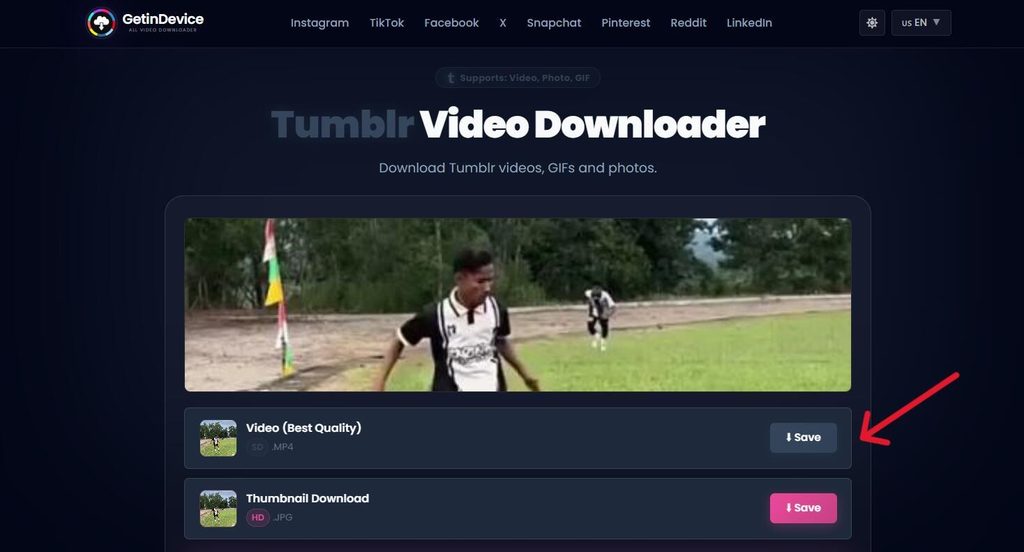
Step 3: Save What You Want
Each item appears as its own file, so you can keep everything or only the one you came for. Tap Save on the files you want. Where they end up depends on your device.
- iPhone and iPad: Use Safari. After saving, open the file from Safari’s Downloads list, tap the Share icon, and choose Save Video or Save Image to put it in Photos. MP3 files stay in the Files app.
- Android: Files go to your phone’s Download folder, and images, GIFs, and videos also show up in your gallery.
- PC, Mac, and Chromebook: Files land in your browser’s Downloads folder.
What Comes Back From Each Kind of Post
- Video posts: an MP4 in the best quality Tumblr has, which means 720p at most.
- GIF posts: the real animated GIF, not a still frame and not a converted video.
- Photosets: every image at full size, one file each.
- Text posts with media: all the images and the video in the post.
- Audio posts: the MP3 behind a song or recording uploaded to Tumblr.
Tumblr’s Own Limits
Tumblr sets these limits for uploaded videos, and they decide what any downloader can return.
| Limit | Tumblr’s figure |
| Length per video | Up to 10 minutes |
| Size per video | Up to 500 MB |
| Videos per day | Up to 20 |
| Total video time per day | 60 minutes |
| Accepted upload formats | MOV or MP4 |
| Re-compression goal | 720p H.264 MP4 |
Source: Tumblr Help Center, Posting Video, page last updated August 18, 2026.
Tumblr compresses GIFs too, so a long or detailed one can look grainy. The download is the same file Tumblr shows, so it cannot be sharper than what you saw. If the same clip exists as a video post, that version usually looks much better.
How It Fits the 5-Point Check
There is nothing to install, and it never asks for your Tumblr login or any personal details. The page uses standard HTTPS, lists your files on the page with a Save button for each, and returns ordinary MP4, GIF, image, and MP3 files. Under its usage terms, GetinDevice does not host or store Tumblr media on its servers, so every file is fetched from Tumblr at the moment you ask. Points three and four are easy to confirm yourself: paste a link and hover over each button before you press it. That habit is worth keeping on every downloader, including this one.
Credit, Reblogs, and Why People Save Posts
Because every reblog points to the same media, you do not need the original poster to download a post. Credit is a separate matter. Before you share a download anywhere off Tumblr, follow the reblog trail to the top and credit the blog at the start of the chain. Typical reasons for saving posts include backing up your own art and animations, building a personal library of reaction GIFs, keeping fandom edits and gifsets, and saving a post before a blog gets deleted.
Recent Updates
The tool page keeps a dated change log. The latest entries:
- August 3, 2026: fixed tmblr.co short links that occasionally sent people to a blog’s main page instead of the specific post.
- July 19, 2026: reworked how multi-image photoset posts are parsed, which cut processing time for larger sets.
- June 24, 2026: GIF posts now return the original animated GIF file instead of a converted video.
GetinDevice is an independent tool and is not affiliated with, authorized, or endorsed by Tumblr. It is meant for personal, non-commercial, and lawful use, so get the creator’s permission before reposting or reusing anything you download.
Frequently Asked Questions
It can be. Pick a browser-based tool with no login and no installation, and check the file type after it downloads. If you want to save Tumblr videos online, look for a tool that passes the five checks above. Most problems come from fake buttons, extensions, and sites that ask for credentials, not from the video itself.
No. Public posts can be read without signing in, so a downloader only needs the post link. If a site asks for your Tumblr password, close it.
Only if you hand over your credentials or install something malicious. A tool that works from a public link never sees your password. Type your login only on tumblr.com.
Free tools have server costs, and ads pay for them. Some advertising is normal. The warning sign is an ad that blocks the page, redirects you, or imitates the download button.
Yes, with a browser-based tool. The steps are the same on both, and the step-by-step section above shows where iPhone and Android save your files. Skip separate downloader apps from unofficial sources.
Saving a public post to view yourself is ordinary personal use. Much of Tumblr is original art, animation, and music that belongs to its creator however often it is reblogged, so reposting it as your own or using it commercially needs permission. When unsure, follow the reblog trail back to the original blog and credit it. This is general information, not legal advice.
Final Thoughts
Using a Tumblr downloader safely comes down to a few habits. Stay in the browser, keep your Tumblr password for Tumblr, hover before you click, and check what the file is before you open it. Online tools have honest drawbacks, including ads and quality limits, so weigh those against the convenience. Ready to try it? Paste a public post link into the GetinDevice Tumblr downloader and see your files listed in seconds. No login, no install, and nothing stored on our servers.