
Twitter, now officially rebranded as X, has become one of the most active platforms for video sharing on the internet. What started as a text-based microblogging site is now filled with breaking news videos, viral clips, long interviews, podcasts in video form, educational threads, and creator-led content. Despite this shift toward video-first content, X still does not provide users with a native option to download Twitter videos directly to their device.
Because of this limitation, millions of users turn to Twitter video downloader tools to save videos for offline viewing, research, or personal use. In this article, we take a deep dive into the top 5 Twitter (X) video downloader tools, ranking them based on real-world usability, download method, supported formats, speed, and overall experience.
Why Do People Use Twitter Video Downloader Tools?
The demand for Twitter video downloader online tools has grown steadily as video content on X has become more valuable and informative. Many users don’t just watch videos casually—they rely on them for learning, work, and content inspiration. However, without a built-in download option, saving these videos becomes difficult.
People commonly use Twitter video downloaders to watch content offline when internet access is limited, save educational or career-related clips, archive important news footage, or keep references for later use. Content creators and marketers also download Twitter videos to study trends, analyze formats, or collect inspiration. In short, a reliable X video downloader makes consuming and managing video content far more convenient.
How Twitter Video Downloaders Work
Most Twitter video downloader tools operate in a simple and user-friendly way, even for non-technical users. Since videos on X are embedded within tweets rather than offered as direct files, these tools extract the media stream and convert it into a downloadable format.
Typically, users copy the tweet link that contains the video, paste it into a Twitter video downloader, and wait for the tool to process the link. Once processed, the tool displays available download options, usually in MP4 format, allowing users to save the video directly to their device. It’s important to note that these tools generally work only with public Twitter accounts, as private content is protected by platform privacy rules.
Key Factors That Define the Best Twitter Video Downloader
Not all Twitter video downloader tools deliver the same level of performance or reliability. While some tools may appear fast on the surface, they can be limited in quality options or fail during high traffic. Others may support multiple formats but feel cluttered or slow due to inefficient processing. Choosing the best Twitter video downloader depends on a combination of technical infrastructure, execution method, and user-facing features, all of which directly impact the download experience.
Behind every downloader is a specific way it processes Twitter video links—whether through direct file fetching, CDN-assisted delivery, or redirect-based execution. Understanding these factors helps users choose a tool that is not only fast, but also stable and safe.
Download Method (Direct vs Redirect-Based vs CDN-Based)
One of the most important differences between Twitter video downloader tools is how the video file is delivered to the user.
Tools that support direct downloading fetch the video stream and deliver the file straight to the user’s device. This method usually results in faster download start times, fewer redirects, and better file integrity. Since the file is sent directly, there are fewer chances of interruption, making this method more reliable—especially on mobile networks.
Redirect-based tools, on the other hand, often route users through multiple pages or external servers before the actual download begins. This execution method can introduce delays, extra ads, and sometimes broken links if one step fails in the chain.
Some advanced tools use CDN-based downloading, where videos are delivered through geographically distributed servers. This can improve speed for users in different regions, but it also adds an extra processing layer. Depending on how it’s implemented, CDN-based delivery may either improve performance or introduce slight delays compared to direct downloading.
In short, the server execution model—direct, redirect-based, or CDN-assisted—plays a major role in speed, stability, and user experience.
Video Quality Support
Video quality support is another key factor that separates an average Twitter video downloader from a high-quality one. A good downloader should always attempt to extract and offer the best available quality based on the original Twitter upload.
It’s important to understand that Twitter itself controls the maximum resolution of a video. If a video was uploaded in HD or Full HD, a well-built downloader can provide those options. However, if the original upload is low resolution, no tool can magically increase quality.
Downloader tools with better processing logic and optimized servers are usually faster at detecting multiple quality streams and presenting clear options to the user. For users who value sharp visuals—such as creators, editors, or researchers—this capability is especially important.
Device Compatibility
Since Twitter is accessed across a wide range of devices, the best Twitter video downloader should work seamlessly across platforms without forcing users to install additional software.
A reliable tool should support:
- Android devices through mobile browsers
- iPhones via Safari or supported iOS workflows
- Windows and macOS systems through modern browsers
Behind the scenes, this compatibility depends on how the downloader executes file delivery. Tools that rely on standard browser-based execution and direct file handling tend to perform better across devices, while tools dependent on scripts or unsupported download methods may fail on iOS or older browsers.
Supported Formats
Most users primarily want to download Twitter videos in MP4 format, as it is widely supported across devices and media players. However, additional format support adds significant value.
Some advanced Twitter video downloader tools also support:
- Downloading Twitter GIFs as MP4 or GIF files
- Extracting audio from video tweets when available
- Saving embedded images from tweets
Format support often depends on the tool’s media extraction process and how it handles different Twitter content types on the server side. Tools with more advanced execution logic can separate video, audio, and visual assets more efficiently, offering users greater flexibility.
Comparison Table: Top Twitter Video Downloader Tools
| Rank | Tool | Download Method | Supported Formats | Speed | Device Support |
|---|---|---|---|---|---|
| 1 | GetInDevice | Direct download (no CDN) | MP4, GIF, Audio | Very Fast | Android, iOS, PC, Mac |
| 2 | SSSTwitter | Distributed servers | MP4 | Fast | Android, iOS, PC |
| 3 | SaveTwitter | Multi-node routing | MP4, GIF, Audio | Fast | Android, iOS, PC |
| 4 | SaveTWT | Load-balanced servers | MP4 | Moderate–Fast | Android, iOS, PC |
| 5 | SnapTwitter | Lightweight optimized servers | MP4, GIF, Images | Moderate | Android, iOS, PC |
1. GetInDevice Twitter Video Downloader (Best Overall)
If you’re looking for a Twitter (X) video downloader that simply works without wasting time, GetInDevice stands out for one clear reason: it’s built around real user behavior, not gimmicks. Most people just want to paste a link, download the video, and move on. That’s exactly what GetInDevice delivers.
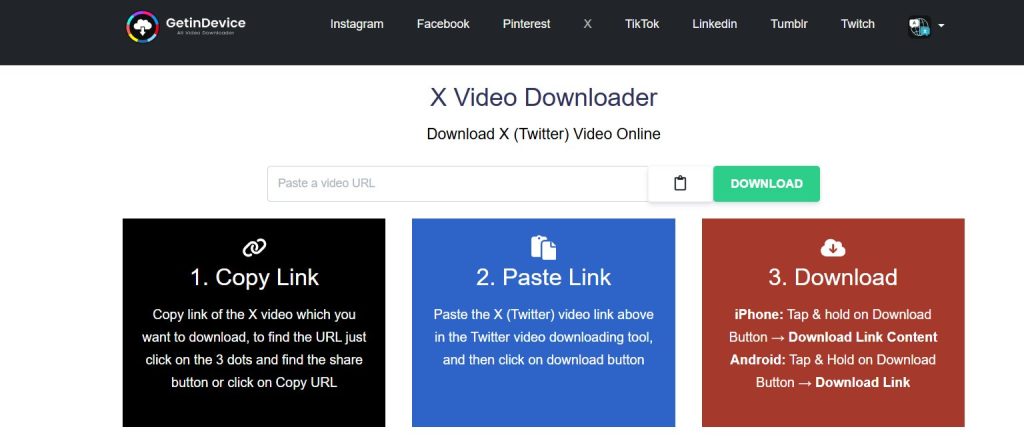
Instead of using CDN layers or multiple redirect steps, GetInDevice relies on direct downloading. This means videos are saved straight to your device, without bouncing through unnecessary pages or third-party servers.
The result?
- Faster download start times
- Fewer failed downloads
- No confusing redirects
- A smoother experience on mobile and slow networks
Even if you’ve never used a Twitter video downloader before, the process feels intuitive from the first click.
Why GetInDevice Feels Better Than Most Tools
Many free downloader websites feel cluttered or overwhelming. GetInDevice takes the opposite approach by keeping the interface clean, minimal, and distraction-free.
What makes the experience smoother:
- Simple copy → paste → download flow
- No pop-ups or misleading buttons
- No forced sign-ups or app installs
- Works directly in your browser
This makes it ideal not just for tech-savvy users, but also for students, professionals, and casual users who don’t want to deal with complicated tools.
Key Features of GetInDevice (At a Glance)
Here’s what GetInDevice actually offers in real-world use:
- ✅ Direct Twitter video downloading (no CDN dependency)
- ✅ Download Twitter (X) videos in best available quality
- ✅ Supports MP4 videos, GIFs, and audio extraction (when available)
- ✅ Popup-free experience for uninterrupted use
- ✅ No login, no registration, no app installation
- ✅ Works on Android, iPhone, Windows, and macOS
- ✅ Supports 40+ languages for global accessibility
These features make it easy to download Twitter videos without worrying about compatibility or privacy issues.
One Tool, Many Platforms (Not Just Twitter)
Another reason GetInDevice ranks #1 is that it isn’t limited to just one platform. It’s designed as a universal social media video downloader, which means you don’t need different tools for different websites.
With the same one-click workflow, you can also download videos from:
- Twitter (X)
- Tumblr
- And other supported platforms
This all-in-one approach saves time and makes GetInDevice especially useful for users who regularly download content from multiple social networks.
Who Should Use GetInDevice?
GetInDevice works well for a wide range of users:
- 📚 Students saving educational videos
- 🧑💼 Professionals archiving useful content
- 🎥 Creators collecting inspiration
- 📰 Researchers and journalists saving news clips
- 📱 Everyday users who want offline access
No matter your use case, the tool stays fast, simple, and predictable.
Bottom Line
GetInDevice earns the #1 spot because it balances speed, simplicity, and versatility better than any other Twitter video downloader on the list. It avoids unnecessary complexity, respects user privacy, and works across platforms without friction.
If you want a no-nonsense Twitter video downloader that also works for other social media platforms, GetInDevice is the most reliable choice right now.
2. SSSTwitter – Fast and Beginner-Friendly Twitter Downloader
If you want a no-nonsense, straightforward Twitter video downloader, SSSTwitter often gets the job done with minimal fuss. Unlike overly complex download sites that clutter the screen with ads or pop-ups, SSSTwitter keeps things simple: just paste a link and go.
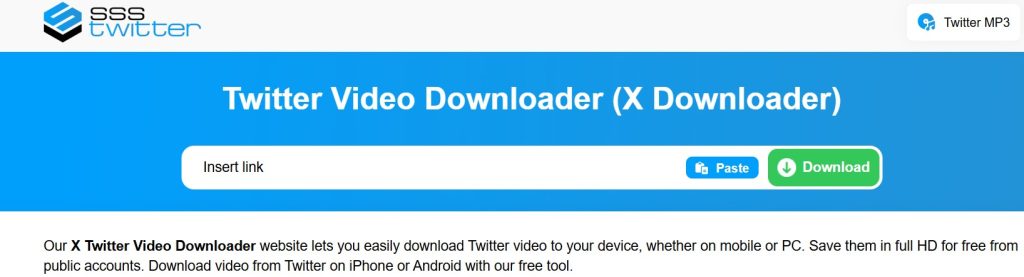
What makes SSSTwitter stand out is its universal browser support — it works on Android, iPhone, and desktop browsers like Chrome, Firefox, and Safari without needing software or extensions. It extracts the media source directly from the tweet, so as long as the tweet is public, SSSTwitter can pull the video and convert it into an MP4 file you can save.
📌 Key Highlights
- ✔️ Free and simple — no accounts or payments required
- ✔️ Works on any device with a browser (phones, tablets, laptops)
- ✔️ Allows unlimited downloads from public tweets
- ✔️ Supports saving videos in HD quality (when available)
- ✔️ Also handles GIFs from Twitter as downloadable MP4s
- ✔️ No top-level restrictions — paste a link and download within seconds
💬 Real-User Friendly
SSSTwitter feels like the tool you’d use if you just want to get the video and move on. It doesn’t overwhelm you with extras; it focuses on letting you download quickly and easily.
Note: Like most tools of its kind, it can only pull media from public tweets, not private or protected accounts.
3. SaveTwitter – Powerful Format Support With Extra Features
SaveTwitter takes the concept of a Twitter video downloader a bit further by offering multiple media options — not just MP4 videos. This makes it appealing if you want to save different types of Twitter content from the same tool.

What sets SaveTwitter apart is its support for not just videos, but also GIFs, images, and even audio (MP3) conversions. That means you can paste a tweet link and choose whether you want the video, a converted audio file, or a static image downloaded — all from the same interface.
📌 Key Highlights
- 🎥 Download videos in high quality — includes options from HD up to 4K/8K when available
- 🎵 Convert Twitter to MP3 audio — great for saving speeches, music tweets, or soundbites
- 📸 GIF and image downloader built in — more versatile than strictly video-focused tools
- 🌍 Multi-device and browser support — works on Chrome, Firefox, Safari, Opera, and Edge
- 💻 No installation needed — browser-based experience with clear steps
💭 Why It’s Useful
Because SaveTwitter supports multiple formats (video, audio, GIF, image), it’s perfect if you’re curating Twitter content for different purposes — like slideshows, music clips, or visual references — without switching between tools.
Tips: SaveTwitter also highlights an optional trick where adding “x2” before a Twitter URL can sometimes speed up retrieval for certain video
4. SaveTWT – Speed-Focused Twitter Video Downloading
SaveTWT is built around a simple principle: download Twitter videos quickly and without barriers. Its design favors users who want to get the file immediately, without extra buttons or confusing options.
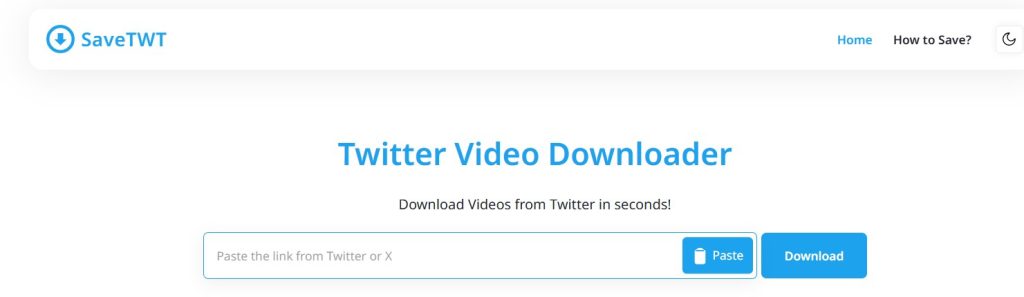
The tool works by establishing an efficient connection to Twitter’s servers and then serving back an MP4 file that you can save to your phone or computer. The workflow is so simple that even non-techie users can follow it without reading help guides.
📌 Key Highlights
- 🚀 Fast processing — the tool starts parsing as soon as the link is pasted
- 📱 Fully cross-platform — works on Android, iPhone, Windows, and macOS via browser
- 🎞️ MP4 download with quality options — choose from SD, HD, or higher when available
- 📜 Simple step-by-step flow — very beginner friendly
- 🔒 Claims an encrypted connection between user and Twitter data sources for safer transfers
💭 Best Use Case
SaveTWT shines when you want a no-frills Twitter to MP4 download. It’s especially good for users who care mostly about speed and compatibility with mobile and desktop browsers alike.
5. SnapTwitter – A Lightweight Multi-Media Twitter Downloader
SnapTwitter isn’t just a video downloader — it also supports GIF and image downloads directly from Twitter links. The site is designed to feel lightweight and optimized for quick results, which makes it a solid choice for casual users who want flexibility without complexity.

SnapTwitter’s interface focuses on giving you everything from a single link. Paste the tweet URL, choose what you want (video, GIF, or image), and download it in your preferred format. It works smoothly on Android, iPhone, and desktop browsers with no software installation required.
📌 Key Highlights
- 📥 Download Twitter videos, GIFs, and images — a multi-purpose tool
- ⚡ Lightweight and optimized for fast results
- 🌐 Works on all major browsers (Chrome, Firefox, Edge, Safari)
- 📱 Mobile friendly — no special setup for phones or tablets
- 📂 Files save directly to your device’s default folder after download
💭 Great For
SnapTwitter is ideal if you don’t just want video downloads but also GIFs and images from Twitter — all without switching tools or pages.
🧠 Quick Tip for All These Tools
No matter which Twitter video downloader you use:
Always respect copyright and user privacy when downloading and sharing media.
Downloads only work from public Twitter accounts — protected or private tweets are not supported.
If a tool says it can access private accounts, use caution.
Final Verdict
As video content continues to dominate X, the way people consume and save information has clearly changed. Twitter is no longer just a platform for short text updates—it has become a major source of news, education, entertainment, and professional insights shared through video. In this environment, having a reliable Twitter video downloader is no longer a convenience, but a practical necessity for many users who want to save important content for offline access, reference, or future use.
Among all the tools reviewed, GetInDevice Twitter Video Downloader stands out by offering the most balanced and user-friendly experience. Its direct download approach, clean and popup-free interface, wide device compatibility, and support for multiple social media platforms make it especially dependable for everyday use. Whether you are a student, creator, professional, or casual user, GetInDevice delivers a smooth and consistent way to download Twitter videos without unnecessary steps or technical complexity. For users who value speed, simplicity, and reliability, it remains the top choice.
