
The digital conversation layer has shifted once again. In early 2026, X officially rolled out In-Stream Image Polls, allowing users to attach high-resolution images directly to each poll option. What looks like a simple feature update is, in reality, one of the most meaningful interaction upgrades X has introduced in years.
At GetInDevice News, we see this as more than just a visual tweak. This is the platform’s clearest signal yet that text alone is no longer enough in a scroll-first, attention-fragmented internet. Image polls fundamentally reshape how opinions are formed, feedback is gathered, and engagement is measured on X.
This guide merges platform mechanics, algorithm insights, creator strategies, and future implications into one ready-to-publish, SEO-optimized deep analysis.
How Image Polls Behave After You Vote
One subtle but important detail of X’s new image polls is how the interface adapts after a user makes a selection. In a desktop preview shared by Nikita Bier, X highlighted a dynamic layout shift designed to keep results readable.
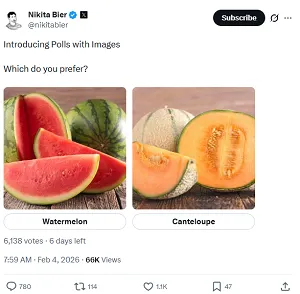
Post-vote behavior includes:
- Images automatically shrink into compact thumbnails
- Poll percentage bars become the visual priority
- Results remain clear without removing image context
This design choice prevents visuals from overpowering the data, ensuring that engagement doesn’t come at the cost of clarity.
X has confirmed that this updated poll format—complete with image support—is now rolling out broadly to users on the latest app versions, signaling that image polls are no longer experimental but part of the platform’s core interaction toolkit.
The Evolution of X’s Poll Infrastructure
For nearly a decade, polls on X were intentionally minimal. Four options, limited characters, no visuals — a design rooted in microblogging purity. While other platforms leaned heavily into stickers, sliders, and image-based voting, X stayed text-focused.
That era is officially over.
The 2026 image poll update marks a Visual-First strategic pivot, aligning X with modern consumption habits where users scan before they read.
Why Text-Only Polls Became Obsolete
Text-only polls also struggled with context compression. Complex choices—like design differences, product variations, or visual opinions—were often reduced to vague labels, forcing users to guess instead of react. As conversations on X shifted toward richer media formats, these limitations made text polls feel incomplete, especially when audiences increasingly expect clarity at a glance rather than explanation in replies.
The Scroll-Scan Reality of 2026
Users no longer read timelines line by line. They skim, glance, and react instinctively. Text-only polls often disappear into the feed noise.
Images solve this instantly:
- Faster comprehension
- Emotional resonance
- Zero language friction
- Higher impulse participation
This update taps directly into visual cognition — the human brain processes images far faster than written language.
Bridging Micro-Blogging and E-Commerce Ambitions
Image polls are not just about engagement — they are a commercial enabler. By allowing users to vote based on visuals rather than descriptions, X is effectively turning polls into lightweight decision tools. Brands can now test product variants, packaging, or creative directions directly inside the feed, reducing friction between discovery and preference. While the results may not replace formal market research, they offer fast, directional insights that can influence launches, campaigns, and creative investments in real time.
From Opinion to Intent
A visual poll featuring four sneaker designs, app UIs, or packaging options does more than ask a question. It:
- Simulates a digital showroom
- Enables real-time preference testing
- Shortens decision cycles
For X’s long-term “Everything App” vision, image polls quietly support commerce, discovery, and conversion without feeling like ads.
What Exactly Are In-Stream Image Polls?
In-stream image polls are an upgraded poll format on X that lets users attach images directly to each poll option, enabling people to vote based on visual choices without leaving their feed. Unlike traditional polls that rely only on short text labels, this format embeds visuals into the poll itself, making comparisons clearer while keeping the experience fast, native, and uninterrupted inside the timeline.
In-stream image polls allow creators to:
- Add an image to each poll option
- Keep polls fully interactive inside the feed
- Combine visuals with short text labels
Everything happens inline — no pop-ups, no redirections.
Step-by-Step: Creating an Image Poll on X
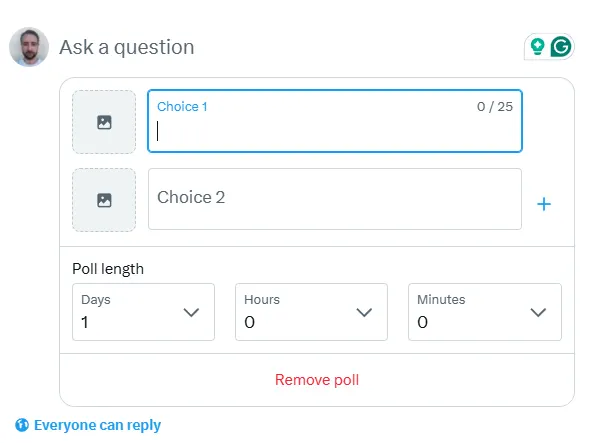
Creating an image poll on X is straightforward. Users can open the post composer, select the poll option, and upload images beside each poll choice before publishing. Once live, the poll appears directly in the feed, allowing audiences to view the visuals, vote instantly, and see results without being redirected elsewhere.
Mobile (iOS & Android)
- Open the Post Composer
- Tap the Poll icon
- Notice the camera icon beside each option
- Upload an image per choice (up to four)
- Crop using the built-in editor
- Add optional text labels
- Set poll duration and publish
Desktop & Web Experience
On desktop, X offers:
- Drag-and-drop uploads
- Faster asset handling
- Live previews for Light & Dark mode
This is especially useful for social media managers working with Canva or Adobe Creative Cloud assets.
Technical Specifications Creators Must Know
| Feature | Specification |
|---|---|
| Max Options | 4 image-based choices |
| Recommended Ratio | 1:1 (Square) |
| File Formats | JPG, PNG, WebP, Static GIF |
| Max Size | 5MB (Mobile) / 15MB (Web) |
| Optimal Resolution | 1200 × 1200 px |
Shrink-to-Fit UI Logic
Before voting, images dominate attention. After voting, visuals collapse into thumbnails, allowing percentage bars to take center stage. This balances storytelling with data clarity.
WebP vs JPG
WebP is now the superior choice:
- Smaller file size
- Better color retention
- Fewer compression artifacts after X’s AI sharpening
How Image Polls Influence the X Algorithm
Image polls send stronger quality signals to the X ranking system by combining interaction with visual attention. When users pause to compare images and make a selection, the platform registers this as intentional participation rather than passive scrolling. These interactions help poll posts surface more frequently in timelines and recommendation feeds, especially when they generate consistent voting activity shortly after publishing.
The Role of Interactive Dwell Time
X’s 2026 ranking system heavily values how long users interact, not just impressions.
Image polls naturally increase:
- Viewing time
- Comparison behavior
- Decision-making pauses
This extended interaction sends strong quality signals.
Engagement Signal Breakdown (Conceptual)
Engagement Value =
(Votes × 2) + (Dwell Time × 0.5) + (Shares × 5)
While proprietary, this model reflects how interactive formats outperform passive posts.
The Re-Post Multiplier Effect
Visual comparisons are inherently shareable. Users are far more likely to quote-post:
- “Which design wins?”
- “This one is obvious”
- “Why is nobody picking option 3?”
Each share expands reach beyond followers into For You feeds.
10 High-Impact Use Cases for Image Polls
1. E-Commerce & Retail
Image polls allow brands to test product prototypes, packaging designs, or color variations before launch. This helps businesses understand visual preference early and reduce guesswork in production decisions.
2. Content Creators
Creators can use image polls to let audiences choose thumbnails, titles, or upcoming content directions. This not only improves performance but also makes followers feel involved in the creative process.
3. Fashion & Beauty
From outfit comparisons to accessory selections and GRWM choices, image polls make style decisions faster and more interactive while keeping everything native to the feed.
4. Travel & Photography
Travelers and photographers can run destination face-offs or ask followers to pick their favorite shots for prints, portfolios, or upcoming projects.
5. News & Media
Media pages can gauge audience reactions to charts, visuals, or debate moments, helping editors understand which formats resonate most with readers.
6. App & UI Designers
Designers can crowdsource feedback on interface layouts, color themes, or feature placement, turning polls into quick visual feedback tools.
7. Entertainment Pages
Image polls work well for comparing movie posters, character designs, or iconic scenes, encouraging fans to participate without needing long explanations.
8. Sports Communities
Sports pages can spark discussion by comparing jersey designs, goal moments, or player highlights, driving engagement during live events.
9. Educators
Educators can use image polls for visual multiple-choice questions or concept checks, making learning more interactive and easier to grasp.
10. Brands Building Community
By letting audiences vote on designs, ideas, or upcoming initiatives, brands can build a sense of shared ownership and stronger community connection.
Privacy, Safety & Moderation Measures
X has built image polls with platform-wide safety systems in mind, applying the same content standards used for visual posts across the network. Images added to polls are reviewed under existing media policies, and voting behavior is monitored to limit abuse or manipulation. These safeguards are designed to ensure that image polls remain a safe, trustworthy interaction format while still allowing creators and brands to experiment with visual content responsibly.
AI-Powered Image Screening
All poll images pass through real-time vision moderation to prevent:
- NSFW content
- Misleading visuals
- Policy violations
Flagged polls may be limited or removed automatically.
Anti-Bot Safeguards
Creators can enable Verified-Only voting for high-stakes polls, protecting data integrity from bot manipulation.
Common Issues & Troubleshooting
Images Not Loading
Usually caused by:
- Cached app data
- Media throttling VPNs
- Outdated app versions
Clear cache and update the app.
Editing After Posting
Not allowed once voting begins. Always preview before posting.
Video Poll Support?
Not yet. Only static images and GIFs are supported. Video polls are rumored for late 2026.
Strategic Implications for 2026 Marketing
Image polls signal a broader shift toward interactive decision-driven marketing on X in 2026. Instead of pushing finished campaigns, brands can now involve audiences earlier in the creative process, using visual feedback to guide messaging, design, and timing. This approach shortens feedback loops, lowers creative risk, and turns audience participation into a measurable input rather than a passive metric—making marketing on X more adaptive, responsive, and data-informed.
Image polls effectively replace:
- Mini surveys
- Early-stage A/B testing
- Low-budget focus groups
They are native, fast, and frictionless, making them one of the most underpriced engagement tools on X right now.
From Image Polls to Video Content: Why Creators Are Saving X Videos More Than Ever
The introduction of in-stream image polls doesn’t exist in isolation. In fact, it’s already reshaping how video content performs on X.
Creators and brands are increasingly pairing visual polls with short-form videos—for example, running an image poll to gauge interest, followed by a video post that expands on the winning choice. This workflow has quietly increased the demand for saving and repurposing high-performing X videos.
Whether it’s:
- A poll-driven product reveal
- A comparison video linked to a winning image option
- A viral brand clip amplified through audience voting
Creators often need offline access to these videos for:
- Content analysis
- Cross-platform repurposing
- Archiving campaign assets
- Performance reviews and edits
This is where a reliable X (Twitter) video downloader becomes a practical companion tool—not for misuse, but for workflow efficiency. When used responsibly, downloading publicly available videos allows creators, marketers, and researchers to study engagement patterns, preserve reference content, and optimize future campaigns driven by interactive formats like image polls.
As X continues pushing toward a more visual and creator-first ecosystem, tools that support content management and analysis naturally become part of the professional creator stack.
Final Verdict: A Small Feature With Platform-Level Impact
The addition of images to in-stream polls isn’t a cosmetic update — it’s a structural shift in how interaction works on X.
It actively:
- Rewards visual-first thinking
- Improves content visibility within feeds
- Produces clearer, more actionable audience feedback
- Reflects how people actually consume content today
For creators, brands, and publishers following GetInDevice News, the takeaway is clear: interaction on X is no longer driven by text alone. Those who adapt to visual decision-making will gain an edge in reach and relevance, while those who don’t risk getting lost in the scroll.
