
Tumblr still doesn’t give you a native save button for video, GIF, or photoset posts. If you want to keep a copy of something before a blog goes private, gets deleted, or a post gets pulled for violating Tumblr’s own guidelines (Tumblr’s terms explicitly reserve the right to remove content or suspend accounts without notice), you’re stuck relying on a third-party tool. The problem is that most “best Tumblr downloader” lists online are just recycled feature tables nobody actually tested.
So instead of writing another one of those, I picked one Tumblr post, copied its link once, and pasted that exact same link into four different Tumblr video downloaders, one after another, on the same phone, on the same internet connection. No switching networks, no cherry-picking the best run, no rewriting a bad experience into a good one. Whatever happened on screen is what got written down, gif proof included for each tool.
Quick answer: if you just want the short version, GetinDevice’s Tumblr downloader fetched the post instantly, showed zero ads anywhere in the actual download flow, and gave three clean options (video, thumbnail, caption) in one screen. The other three tools each came with some combination of unclosable ads, confusing button labels, or missing features. Full breakdown below.
How This Test Was Done
The method was kept deliberately simple and identical across every tool:
- Same post, same link: one Tumblr video link, copied once, pasted into all four tools without changing it
- Same device, same connection: tested on a phone over one stable internet connection, back to back, so no tool got an unfair speed advantage
- Same actions everywhere: paste the link, hit download, try every option that shows up (video, thumbnail, caption, audio if present)
- Everything logged as it happened: ads, popups, redirects, confusing labels, and load times were all noted in real time, not reconstructed from memory afterward
- Screen-recorded proof: each test was recorded and converted to a gif so the experience described below isn’t just a claim, it’s something you can watch happen
The four tools tested, in the order they were tried:
- GetinDevice Tumblr Downloader
- AnyDownloader
- SaveTumblr
- VideoDubber
1. GetinDevice Tumblr Video Downloader
GetinDevice went first, and it set a bar the other three tools didn’t come close to. Pasting the link took one tap using the built-in one-click paste button.
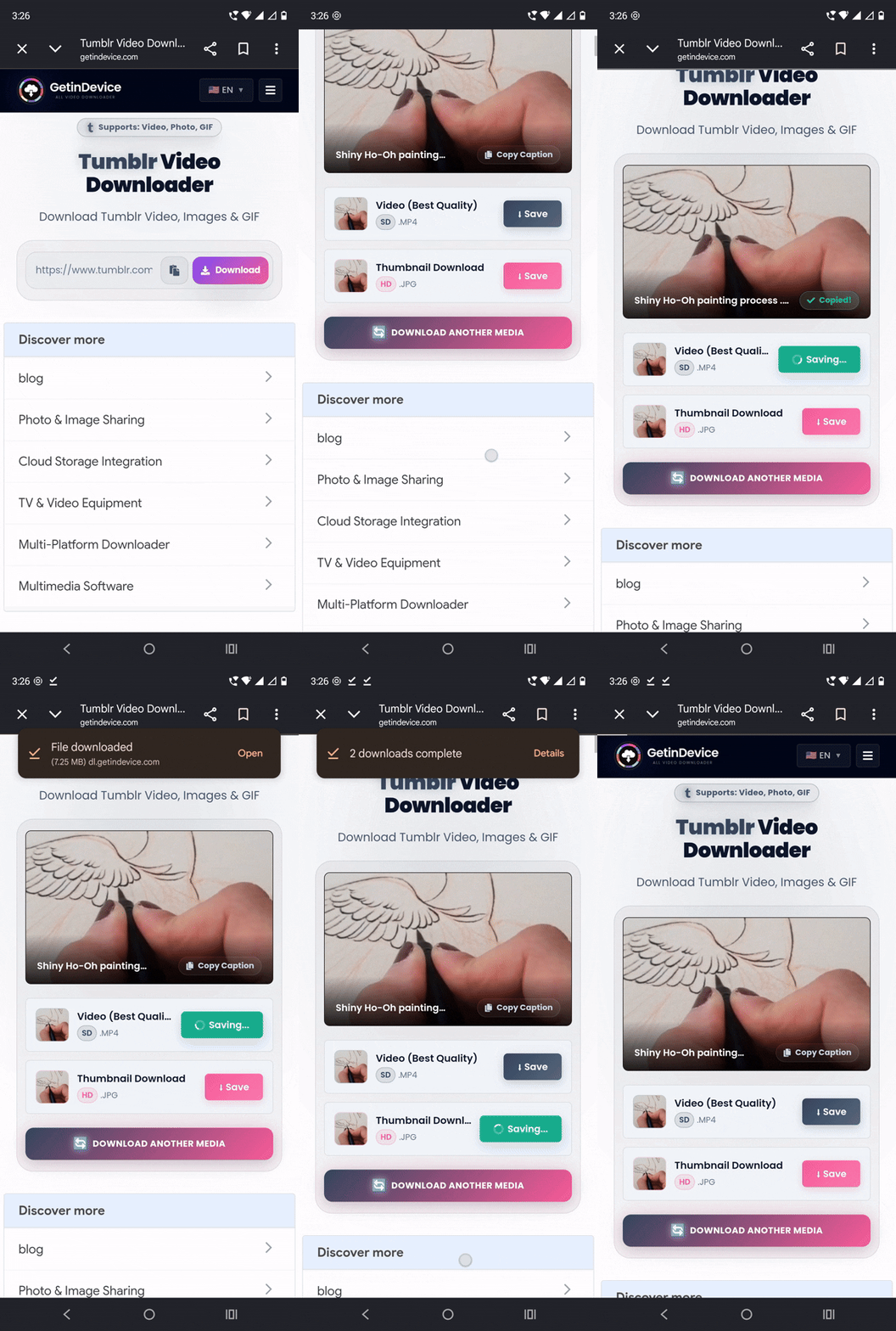
The post loaded at what felt like flash speed, no visible fetch delay, no ad flashing in before or after. What came back was a clean results screen with exactly three options: download video, download thumbnail, and copy caption (useful for grabbing the post’s hashtags or text without retyping anything). Every one of those three buttons was tapped, and every one of them worked without a single ad interrupting the process.
The only ads present at all were small text ads placed off to the side of the working area, low enough impact that they didn’t get in the way of actually using the tool.
Why GetinDevice Comes Out Ahead
Beyond just this one test, a few things make GetinDevice the stronger pick for Tumblr specifically:
Pros:
- Zero ads inside the actual paste-to-download flow, the only ads present sit outside the working area
- One-click paste button removes a manual step every other tool required
- Three-in-one output: video, thumbnail, and caption text, without needing to run the link through a separate tool for each
- Correctly handles GIFs as true animated GIF files and photosets as full-resolution individual images, not just standard video
- Doesn’t require a Tumblr login or any personal information
- Part of a single platform supporting 50+ social media downloaders (Instagram, TikTok, Facebook, Snapchat, Pinterest, Reddit, and more), so the same site covers virtually every platform someone might need to save from
- Has a dedicated Android app on the Play Store, letting you download and stream Tumblr videos directly from your phone without opening a browser tab each time
Cons:
- Small text ads are visible on the page, though outside the download flow itself
If you only bookmark one tool from this comparison, this is the one. It did what it claims to do, at the speed it claims to do it, with none of the friction the competitors added.
The same paste-and-download experience carries over to GetinDevice’s other tools too, including the Instagram video downloader, TikTok downloader, so anyone bookmarking this for Tumblr ends up covered for the rest of their feed as well.
2. AnyDownloader
AnyDownloader started poorly and mostly stayed that way. The moment the page opened, a large ad for an unrelated product (a phone, in this case) covered the visible area, and it had no close button or cross mark anywhere on it. The only way past it was scrolling down manually to find the actual paste box, which sat below the ad along with a one-click paste button of its own.
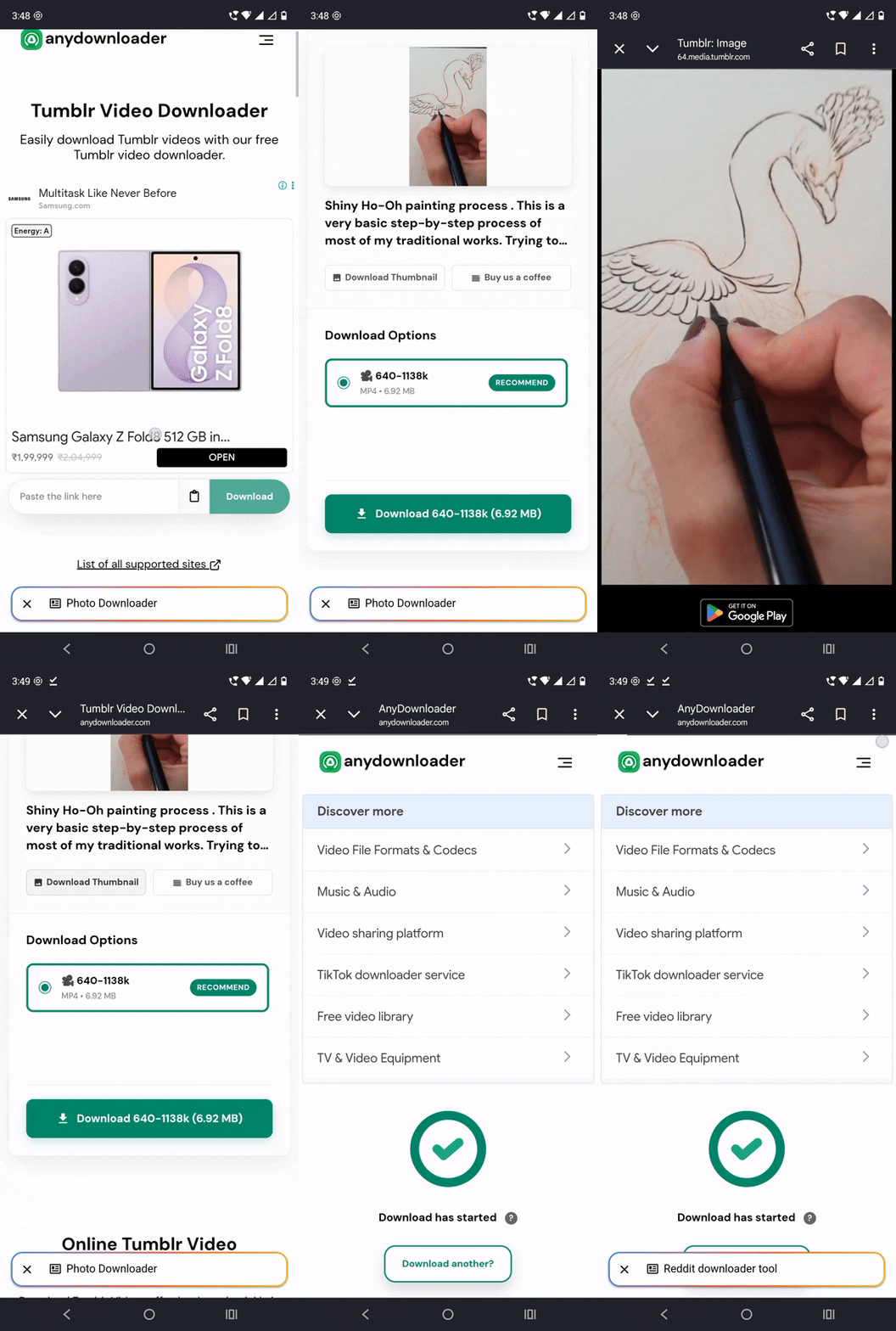
After pasting the link and hitting download, the screen swiped down to reveal the results. There was no caption-copy option anywhere. Instead, there was just a line of text under the video’s cover image with no explanation of what it was for or how to use it. The video quality selector offered exactly one option, labeled “recommended,” which isn’t really a choice at all if it’s the only thing on the list.
Clicking download triggered a fresh set of text ads, followed by a 7-second countdown timer before the video actually started downloading. Testing the thumbnail button separately led to a redirect to a different subdomain page where the thumbnail image opened on its own, with no visible save button anywhere. The only way to actually save it was to tap and hold on the image until a hidden “download image” option appeared, something a first-time user has no way of knowing without trial and error.
Pros:
- One-click paste button, once you find it
- Video did eventually download successfully
Cons:
- Full-screen ad on arrival with no way to close it
- Paste box hidden below the fold, requires scrolling to even find it
- No caption-copy option, and an unlabeled text field with no instructions
- Only one video quality option despite being labeled a “choice”
- 7-second forced wait timer before download starts
- Thumbnail saving requires an undocumented tap-and-hold gesture on a redirected page
3. SaveTumblr
SaveTumblr’s homepage looked clean and minimal at first, with a single paste box and a red Download button front and center. But within a second of the result loading, a popup ad slid up from the bottom of the screen and had to be manually closed before continuing.
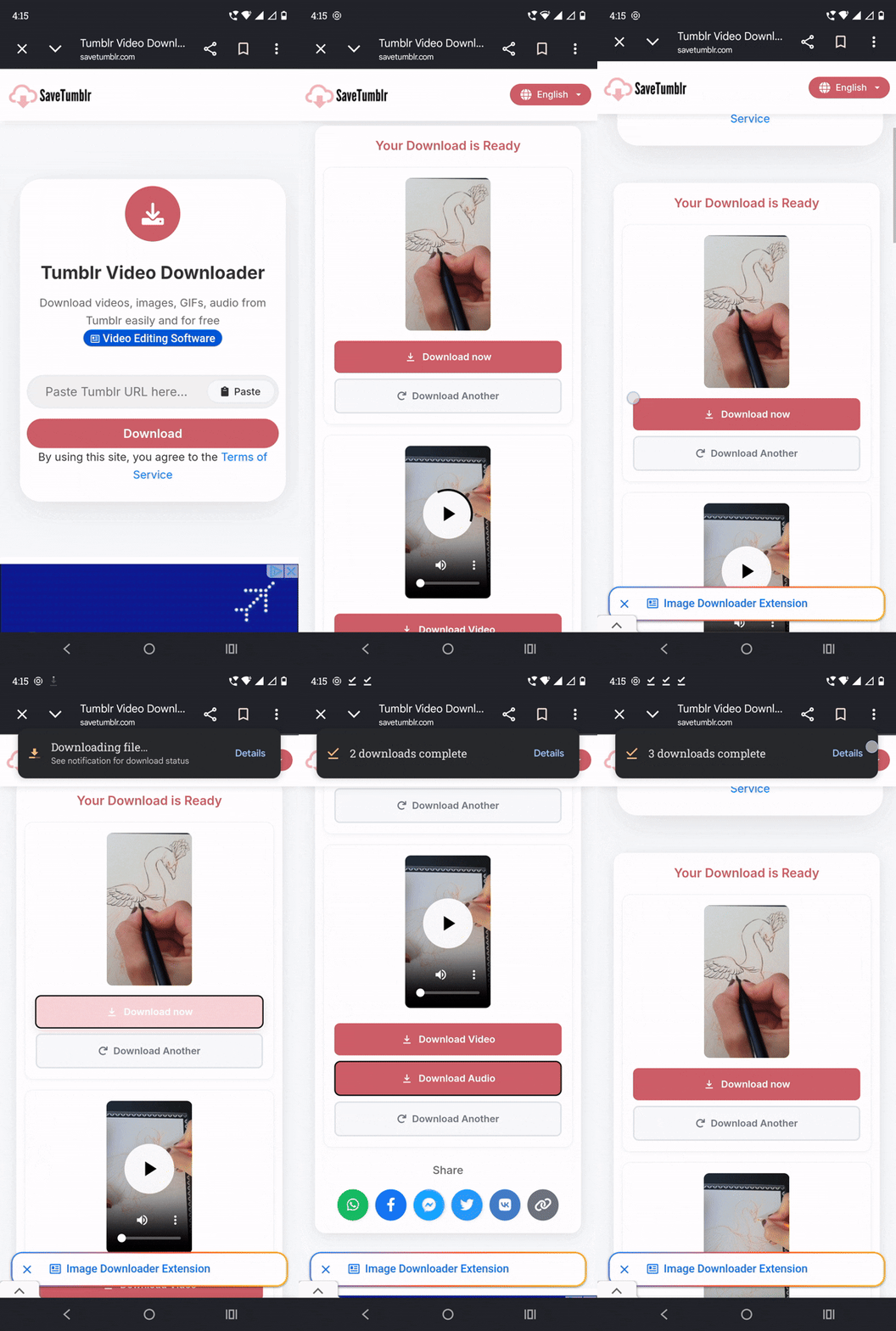
Once that was out of the way, two buttons appeared: Download Now and Download Video. Nothing about the labeling makes it obvious what the difference is, and testing confirmed the confusion is real: “Download Now” actually downloads the post’s thumbnail image, not the video, despite being the more prominent-sounding label. “Download Video” is the one that actually saves the video file. A user going with their first instinct here would likely end up with a thumbnail image instead of the video they wanted.
On the plus side, scrolling further down revealed a “Download Audio” option sitting just above the text ads at the bottom of the page, letting the post’s audio track be extracted separately, something none of the other three tools offered at all.
Pros:
- Clean, minimal-looking homepage
- Only tool in this comparison to offer a separate audio-only download
- Video download itself worked correctly once the right button was found
Cons:
- Popup ad appears within a second of the result loading
- “Download Now” and “Download Video” are confusingly labeled, and the more obvious-sounding one is actually for the thumbnail
- Easy to end up downloading the wrong file type by mistake
4. VideoDubber
VideoDubber was the slowest of the four by a clear margin. Pasting the link triggered a noticeable delay, followed by a Cloudflare verification check before anything loaded. Once the post did appear, the option set was the thinnest of any tool tested: a Download Video button, a Play button, and an Open in tab button. That’s the entire feature set, no thumbnail download, no caption copy, and no audio extraction.

Pros:
- Interface is simple with nothing to get confused by
- Play button lets you preview before downloading
Cons:
- Cloudflare verification adds a real delay before the tool is even usable
- No thumbnail, caption, or audio download options
- Slowest overall experience of the four tools tested
Side-by-Side Comparison
| Criteria | GetinDevice | AnyDownloader | SaveTumblr | VideoDubber |
|---|---|---|---|---|
| Fetch speed | Instant | Moderate (after ad/scroll) | Fast | Slow (Cloudflare check) |
| Ads in download flow | None | Full-screen, unclosable | Popup ad | None seen |
| Video download | Yes | Yes | Yes (via correct button) | Yes |
| Thumbnail download | Yes, one tap | Yes, hidden gesture required | Labeled as “Download Now” | Not available |
| Caption/text copy | Yes | No | No | No |
| Audio-only download | No | No | Yes | No |
| Quality options | N/A, original quality returned | One option only | Not tested separately | Not applicable |
| Confusing labeling | None | Mild (unlabeled text field) | Yes (Download Now vs Download Video) | None |
| Extra platforms supported | 50+ | Limited | Limited | Limited |
| Dedicated app | Yes (Android, Play Store) | No | No | No |
Verdict
Across every stage of this test, from the first tap to the last download, GetinDevice was the only tool where nothing needed to be worked around. No ad to dodge, no mislabeled button to second-guess, no hidden gesture to discover by accident. It returned the video, the thumbnail, and the caption in one pass, and it’s backed by a site that covers 50+ platforms plus a dedicated Android app for anyone who wants the same experience without opening a browser. The other three tools all got the video downloaded eventually, but each one added friction GetinDevice simply didn’t have.
Frequently Asked Questions
Generally yes, as long as the tool doesn’t ask for a Tumblr login or personal information and runs over HTTPS. GetinDevice, for example, never requests login credentials and fetches files directly from Tumblr’s own delivery servers rather than storing anything itself.
Tumblr, now owned by Automattic after its 2019 acquisition from Verizon, has never built a native save option for video, GIF, or photoset posts, since the platform is built around browsing and reblogging rather than local archiving. That gap is exactly what third-party downloaders exist to fill.
It depends on the tool. GetinDevice returns GIF posts as the actual animated GIF file Tumblr stores, rather than converting it into a static image or a separate video format.
No. The underlying media file is identical no matter which blog’s reblog the link points to, so downloading from any reblog in the chain returns the same file the original post would.
Only GetinDevice offered a dedicated caption-copy option in this test, letting the post’s text be copied alongside the media without retyping it manually.
GetinDevice is the only tool in this comparison with a dedicated Android app, available on the Play Store, which adds a built-in play/stream option on top of the download function.