
Story Pins, Idea Pins and Video Pins aren’t three formats you pick from in 2026. Story Pins and Idea Pins are older names for the same multi-page creator format. Pinterest folded it into regular Pins in 2023, and a Pin built from video, or from several images and clips, now comes out as a Video Pin.
One detail trips people up. Pinterest’s own Pin specs page gives organic Video Pins a window of 4 seconds to 5 minutes. We checked it on October 26, 2026. Some guides say 15 minutes, and that number belongs to video ads.
Here’s the quick version.
| Name | Status | What it is |
|---|---|---|
| Story Pin | Retired name | Early multi-page creator format |
| Idea Pin | Merged into Pins in 2023 | Story Pins with more editing tools |
| Video Pin | Current | Any Pin made from a video, or from several assets stitched into one |
How Pinterest Ended Up With Three Names
Pinterest has renamed and merged this format more than once. Old tutorials, YouTube videos and blog posts still use whatever name was current the day they were written, and that’s most of the confusion.
Story Pins came first. They started in beta in September 2020. When Pinterest launched Idea Pins in May 2021, TechCrunch described the new format as essentially a rebranded Story Pin with a wider set of editing tools. Same idea, bigger toolbox.
The next change was bigger. On May 11, 2023, Pinterest announced that Pins and Idea Pins would share one creation flow, simply called Pins. Links, editing after publishing and flexible aspect ratios, which used to belong to standard Pins, opened up to everyone. Video Pins also gained views and watch time in their metrics.
The rollout wasn’t instant. After the May 2023 announcement, creators on Pinterest’s community forum wrote that they still saw the old Idea Pin tool, and one said the update seemed to be reaching accounts in no clear order. Pinterest’s own answer to “What happened to Idea Pins?” is short: they are now Pins. A Pinterest community manager gave the same answer to a newcomer in February 2026, so the old name still causes confusion today.
The Timeline at a Glance
| When | What happened |
|---|---|
| September 2020 | Story Pins start in beta |
| May 2021 | Idea Pins launch, with up to 20 pages per Pin |
| May 11, 2023 | Pinterest announces that Pins and Idea Pins will share one creation flow |
| February 2026 | A Pinterest community manager still tells a newcomer that Idea Pins are now Pins |
Story Pins: Where It Started
Story Pins were Pinterest’s early step into story-style content, built from pages instead of a single image. They began in beta in September 2020. Unlike Stories on other apps, they didn’t disappear after a set time, so people could find them through search. They lived apart from regular Pins, and you rarely see the name today. If an article leans on it, the article is probably old.
Idea Pins: The Creator Format
Idea Pins took the Story Pin concept and loaded it with tools. At launch in May 2021, TechCrunch reported up to 20 pages per Pin, with up to 60 seconds of video on each page. Creators got voiceover, background music, transitions, stickers, and detail pages for ingredients or instructions. It felt closer to a short video editor than a pin board.
Creators had two creation paths, one for Idea Pins and one for standard Pins, and plenty weren’t sure which to use. A newcomer on the community forum even asked Pinterest whether months of posting only “idea pins” had been a mistake.
Video Pins: What You Use Today
Since the merge, there’s one create flow. Pinterest’s own FAQ for creators says the features people liked in Idea Pins, such as music, stickers and product tagging, now sit alongside links, scheduling, editing after publishing and different aspect ratios on every Pin.
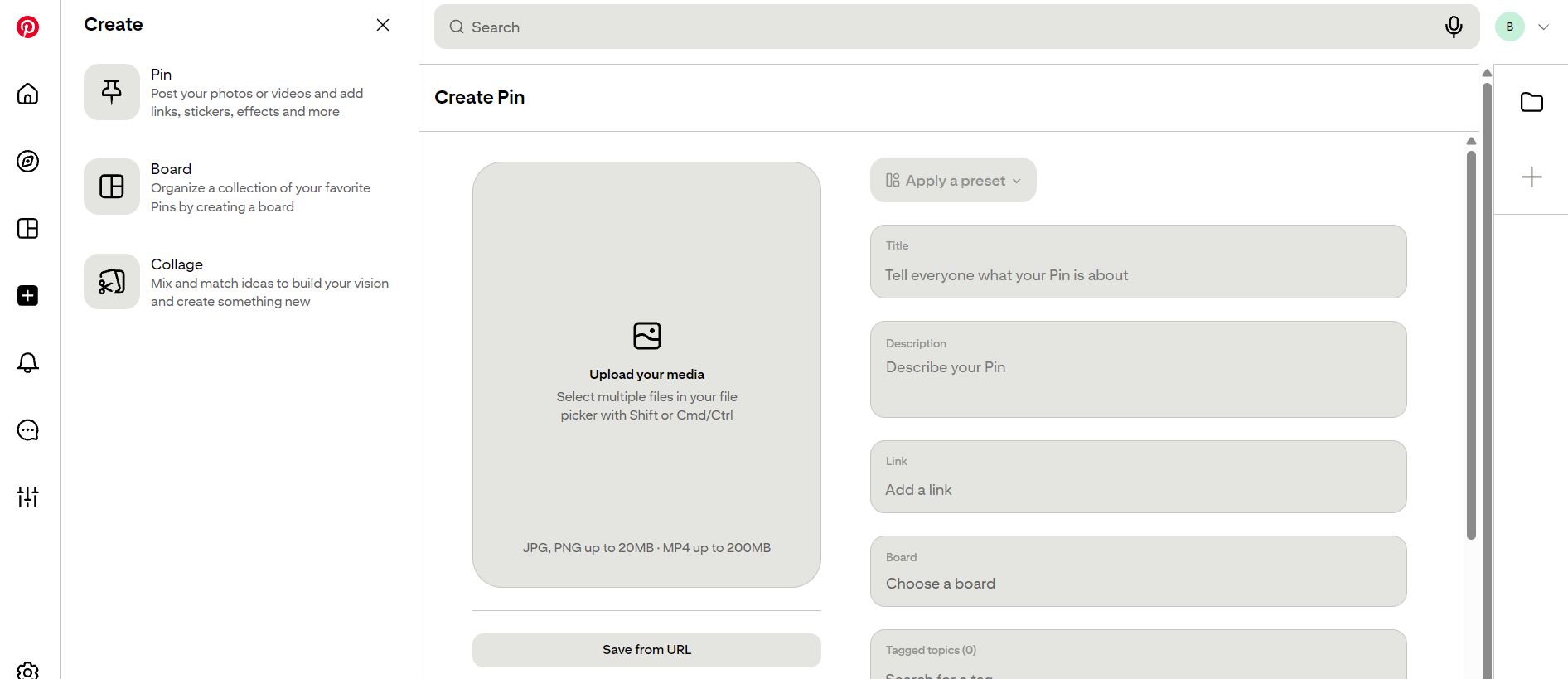
What you upload decides the format. In the iOS and Android apps, picking several images, several videos, or a mix of both stitches them into one Video Pin. On desktop, the upload box lets you select several files at once, and it shows a limit of 200 MB for MP4 files.
A single image stays an image Pin, but adding music or GIF stickers turns it into a video. Pinterest says it dropped pages so that image and video are the two main Pin types. In the 2023 announcement, Pinterest also said this kind of content now plays one piece after another, so viewers no longer tap through.
Video Pin Limits at a Glance
| Item | Limit |
|---|---|
| Length | Minimum 4 seconds, maximum 5 minutes |
| File types | Web: MP4, M4V. iOS and Android: MP4, MOV, M4V |
| Encoding | H.264 or H.265 |
| Aspect ratio | 9:16 (1080 x 1920 px) recommended for full-screen video. Also accepted: 1:2, 2:3, 3:4, 4:5, 1:1 |
| Title | 100 characters max |
| Text box | 250 characters max |
| Description | Up to 800 characters |
Idea Pin and Video Pin Side by Side
| Idea Pin (2021 to 2023) | Video Pin (today) | |
|---|---|---|
| Structure | Up to 20 pages | One video. Several uploads stitch together |
| Video length | Up to 60 seconds per page | 4 seconds to 5 minutes |
| Links | Not available | Available on every Pin |
| Status | Retired name | Current |
Where Spec Pages Disagree
Search for Video Pin limits and you’ll find a mess. Some guides say 15 minutes. Marketing guides that quote Pinterest’s ad specs, like this one from Tailwind, list 15 minutes for video ads. That limit doesn’t apply to regular Pins. Other guides still print Idea Pin numbers, like 20 pages and 60 seconds a page. Those belong to the old format.
For a regular Video Pin in 2026, use the Pin specs page and its 5 minute limit. Pinterest can change that page, so check it again before you post a long video.
Since the merge, there’s one create flow. Pinterest’s own FAQ for creators says the features people liked in Idea Pins, such as music, stickers and product tagging, now sit alongside links, scheduling, editing after publishing and different aspect ratios on every Pin
Which Format Fits Your Goal
You aren’t choosing between three formats anymore. You’re choosing what kind of Pin to make.
One strong photo – Make a standard image Pin. Nothing forces you into video.
A short clip or a set of photos – Go with a Video Pin. Stitching several assets into one video suits quick before-and-afters, and the 4 second to 5 minute window leaves plenty of room.
Steps to teach – Fit them into one video. Use the description, which allows up to 800 characters, for the details the video can’t hold.
Traffic to your own site – Add a link. It’s the most practical reason to prefer today’s flow over the Idea Pin era.
You lost the original file – If you made a Video Pin and the source clip is gone, a pinterest downloader can pull the video from the public Pin link. Check your camera roll and editing app first, though. Your own export is always the better place to start.
Keeping a Copy of a Video Pin
Sometimes the Pin is the only copy left. A pinterest video downloader works from a public Pin link and gives you the video as an MP4 file. That helps if you want to reuse your own work or keep a reference clip offline.
Here is what our tool can and can’t do, so you know before you try.
- It works on public video Pins and on pin.it share links.
- It doesn’t work on secret boards, private profiles or deleted Pins.
- It takes one link at a time, so you can’t save a whole board at once.
- The quality is whatever the creator uploaded. It can’t add detail that was never there.
The other common way is screen recording. It captures the video at your screen size and often picks up buttons and the status bar, so the copy usually looks worse.
One firm rule. Save only content you made or have permission to use. A Pin belongs to its creator.
Pros and Cons
| Format | Pros | Cons |
|---|---|---|
| Story Pin | Early step-by-step format | Retired, limited tools |
| Idea Pin | Rich editing, detail pages | No links at the start, split creation flow |
| Video Pin | Links, scheduling, edits after posting, metrics | Pages merge into one video, 5 minute cap |
FAQ
Not as a separate format. Pinterest says Idea Pins are now Pins, and its team repeated that answer to a newcomer in February 2026.
Pinterest’s Pin specs page sets a minimum of 4 seconds and a maximum of 5 minutes. We checked it on October 24, 2026. The 15 minute number you may see elsewhere is for video ads.
Pinterest says older Pins with pages are kept and shown as videos. You can also edit an old Idea Pin to add a link. Be careful, because editing a link on any Pin removes its earlier reactions and comments.
No. Pinterest dropped pages. On iOS and Android, several uploads now stitch together into one Video Pin.
Yes, if the Pin is public. An online Pinterest downloader can fetch the video from the Pin link as an MP4 file. It can’t reach secret boards or private profiles. Save only what you made or have permission to use.