
If you have ever received a TeraBox link in a Telegram group, a Reddit thread, or a WhatsApp forward, you already know the drill. You tap the link, TeraBox’s own page opens, and instead of your file, you get an app install prompt, a login wall, or a download bar crawling along at a speed that makes you question your internet connection. It’s not your connection. TeraBox throttles free and anonymous downloads on purpose, to push people toward a paid plan.
That’s the entire reason a “TeraBox downloader” category exists online. Paste the link into one of these tools instead of TeraBox’s own page, and you’re supposed to get the file directly, without the app, the login, or the wait.
Supposed to. In practice, the tools that promise this vary wildly, from genuinely smooth to borderline unusable. So instead of writing another roundup based on what each site claims about itself, I took the same TeraBox video link and ran it through five separate tools, one after another, on the same phone. I recorded every step. Here is exactly what happened with each one, followed by a straight comparison and my actual recommendation.
What TeraBox Actually Is (Quick Context)
If you’re not familiar with it, TeraBox is a cloud storage service that gives away 1024GB (1TB) of free storage to anyone who signs up, which is why it gets used constantly for sharing files too large for a normal chat attachment: course bundles, movie rips, work deliveries, whole photo folders. The person receiving the link usually doesn’t need an account at all, which is exactly why these links travel so easily across Telegram, Reddit, WhatsApp, and forums.
The catch is on the free tier. TeraBox’s own app and website work fine for viewing a share, but downloading through them, especially on mobile, tends to push you toward installing the app, and download speeds on free and anonymous access are commonly reported well below normal broadband speed. That gap between “free to view” and “annoying to actually download” is the entire reason TeraBox downloader tools exist as a category. They sit between you and TeraBox’s own throttled flow, and in theory hand you the file directly.
In theory being the key phrase, since as this test shows, not every tool that promises that actually delivers it cleanly. A lot of these links also show up shared through Telegram channels or Reddit threads in the first place, since those platforms have their own attachment-size limits that TeraBox doesn’t.
Quick Answer
If you just want the short version: iTeraBox, a dedicated TeraBox link downloader, was the only one of the five that took me from pasting the link to a finished download with zero ads, zero app prompts, and zero redirects. GetinDevice’s TeraBox video downloader came a close second: no app prompts and no redirects, and while it does show some ads on the page, popup ads were minimal and nothing got in the way of the download. TeraDownloader and 1024TeraDL both worked eventually, but only after ad walls, confusing button layouts, or a stuck “loading” screen. iTeraPlay capped guest users at 0/5 plays or downloads before you even try the link.
The rest of this article walks through why, tool by tool, with what I actually saw on screen.
How I Tested These
To keep this fair, I used one TeraBox share link, the same video, across all five tools, on the same device, in the same browser. I wasn’t looking for which site had the nicest homepage copy. I was looking for what actually happens between pasting a link and having a playable file saved on my phone: how many taps it takes, whether ads or app prompts get in the way, whether the download starts where it says it will, and whether the interface tells you clearly what to click next.
The five tools: iTeraBox Downloader, GetinDevice, TeraDownloader.com, 1024TeraDL.com, and iTeraPlay.com. They’re listed below from best to worst experience.
All five tests were run on a phone browser, not desktop, which matters more than it sounds. Mobile is where most of the friction on these sites actually shows up. Ad placements get more aggressive on smaller screens, app-install prompts are far more common on mobile because that’s where TeraBox’s own app-install nudge normally lives too, and a cluttered layout that might be manageable on a wide desktop screen turns into a lot of scrolling and squinting on a phone. If a tool feels clean on mobile, it’s a fair bet it holds up on desktop as well. The reverse isn’t always true.
I also kept screen recordings of each test, converted to short clips, as a record of what actually happened rather than relying on memory or notes written after the fact. What’s described below is what showed up on screen, in the order it showed up.
1. iTeraBox Downloader
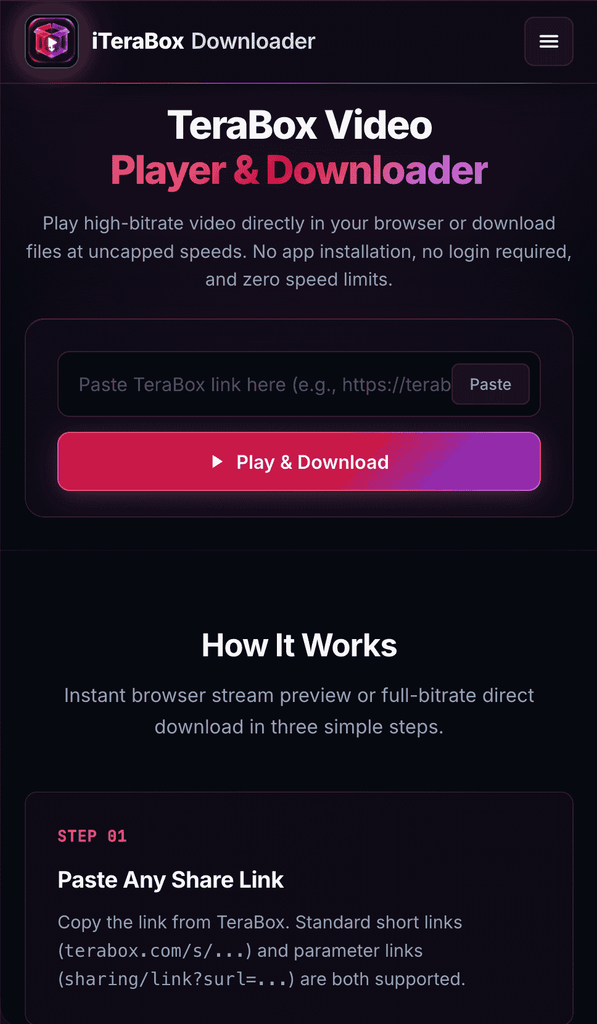
iTeraBox Downloader is a dedicated TeraBox link downloader, and it shows. The homepage is one paste box and one button, “Play & Download,” with nothing competing for attention above it. No app install prompt on arrival, no cookie wall, no ad banner pushing the tool below the fold.
I pasted the link and tapped the button once. The file resolved in a few seconds and the video opened in a player right on the page. I hit play expecting at least one pre-roll ad, since that’s what most of the tools in this category do at exactly this moment. Nothing interrupted it. The stream started straight away and played cleanly.
Then I tapped Download. No popup, no “install our app for faster speed,” no redirect to a second page or another subdomain. The MP4 started saving immediately and finished without a single interruption. No login was asked for at any point, and there was no guest counter or daily cap anywhere on the page.
A few things set it apart beyond the clean flow:
- Link formats: it accepts both standard short links (terabox.com/s/…) and the longer “surl” parameter links, plus TeraBox’s other official domains like 1024terabox.com, teraboxapp.com, teraboxshare.com, and teraboxlink.com.
- Folder links: a shared folder gets listed file by file with each file’s name, size, and extension, so you can grab only what you need instead of one huge archive.
- Non-video files: ZIP, RAR, APK, and PDF files come through with their original names and extensions intact.
- Original quality: according to the site, videos are rebuilt into an MP4 by copying the stream as-is rather than re-encoding it, so quality matches the original upload.
- No file size limit: their FAQ states there’s no cap on file size.
In short, it did exactly what every tool in this category claims to do, with nothing in the way. That’s why it sits at number one.
2. GetinDevice TeraBox Downloader
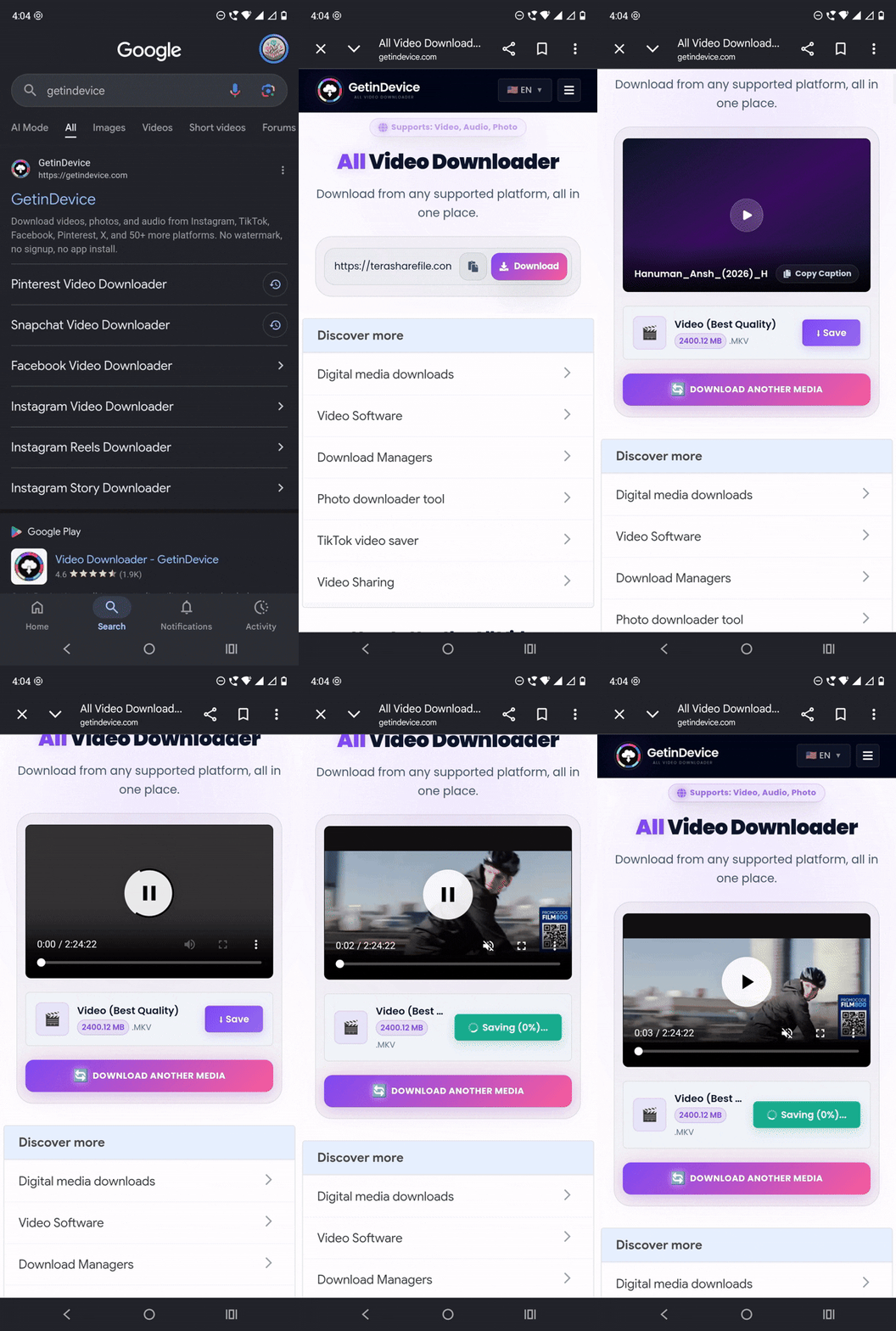
I pasted the link into the box and clicked once. The page fetched the file in a matter of seconds, no spinner that drags on, no “please wait” screen. Right away, it showed me two clear options: stream it online or save it. Every button was exactly where I expected it to be, nothing hidden behind a confusing menu.
I clicked to play the video first, and the video just started playing, full screen option available if I wanted it. Then I clicked Save. No popup asking me to install anything, no redirect. The download started immediately at what felt like full speed, and it finished without a single interruption.
To be upfront: GetinDevice does show ads on the page. They’re mostly standard display ads placed around the tool, and popup ads are kept to a minimum, so they never covered the paste box, the player, or the download button. There was no “watch this ad to continue,” no app install nag, and no redirect to a different page halfway through. You paste, you get options, you click what you want, and it does that thing.
That handful of ads is the only reason it sits just behind iTeraBox, which had none at all. The other difference is scope: GetinDevice is a multi-platform downloader, so the same site also handles Instagram, Facebook, TikTok, X, Pinterest, and more. If TeraBox is one of several platforms you download from, that makes it the more convenient pick to bookmark.
3. TeraDownloader.com
Next up was TeraDownloader.com. The moment the page loaded, a screen popped up pushing me to install their app. I dismissed it and pasted the link into the box manually.
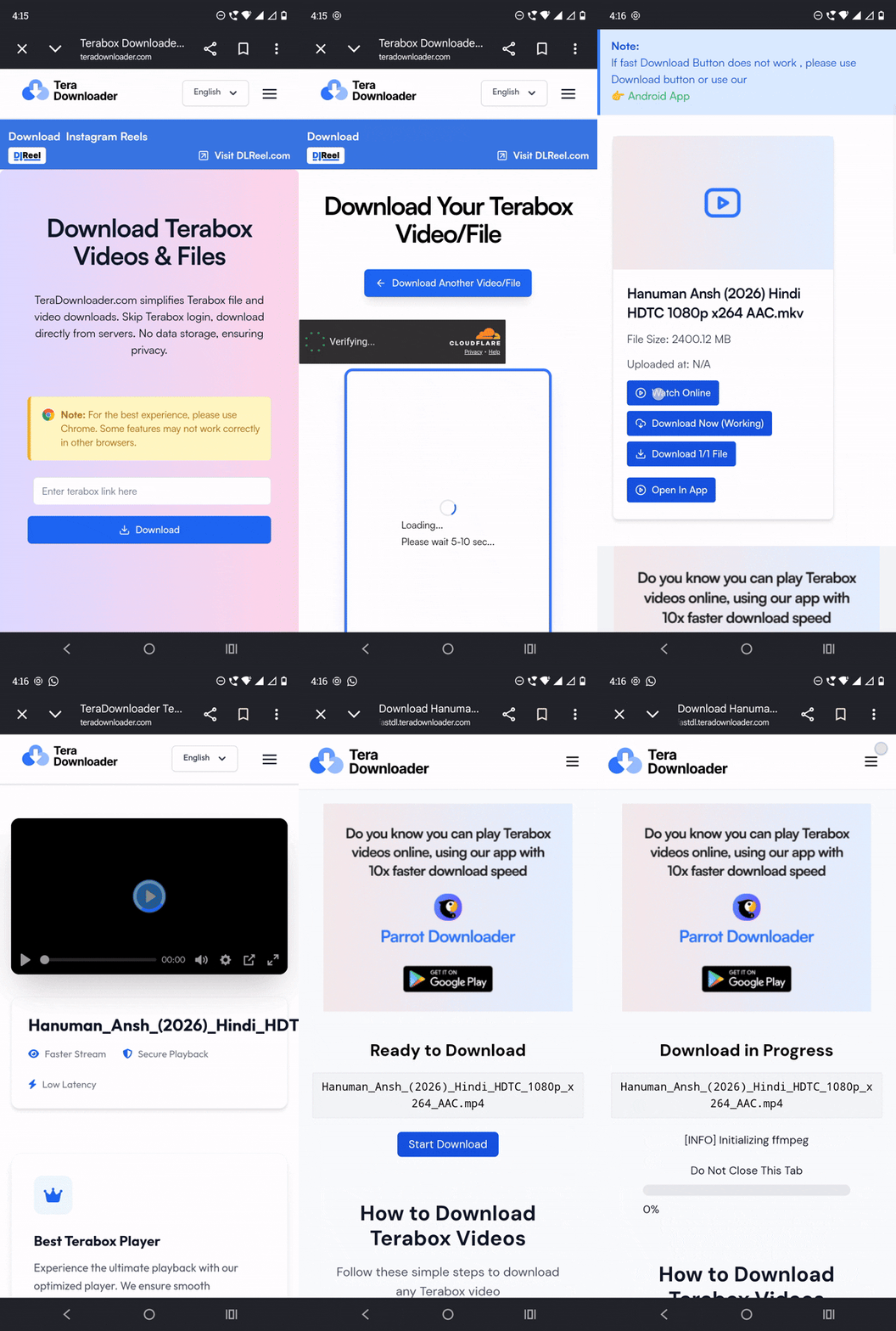
Clicking Download triggered a Cloudflare verification check, which added a small delay but is at least a normal security step rather than a dead end. After it passed, I landed on a different page with four separate options stacked on top of each other: Watch Online, Download Now, Download 1/1 file, and Open in App. Four choices for what should be one action is a lot, and it wasn’t obvious which one actually gets you the file versus which one just streams it or shoves you toward the app again.
I clicked Watch Online first, and that part worked fine, the video streamed without issue. Going back to actually download it was where things fell apart. I clicked Download Now and it sat there loading for several minutes with nothing happening. Eventually it redirected me to yet another page, this one showing a cover image promoting their app again. Underneath that, there was finally a “Ready to Download” button, and clicking that is what actually got the download moving.
So the file did eventually download, but getting there took an app-install dismissal, a Cloudflare check, a confusing four-option screen, a stalled loading state, and a second redirect before the real download button showed up. Worth flagging too: their own FAQ states this tool only works with individual file links, not folders, so a shared folder link is a dead end here regardless of how the rest of the flow goes.
4. 1024TeraDL.com
This one, 1024TeraDL.com, had the heaviest ad presence of anything I tried. The site loaded straight into a wall of ads that I had to close one at a time. Once I cleared those, it showed a “watch 1 short ad to continue” prompt, which I had to sit through before the page would let me do anything else.
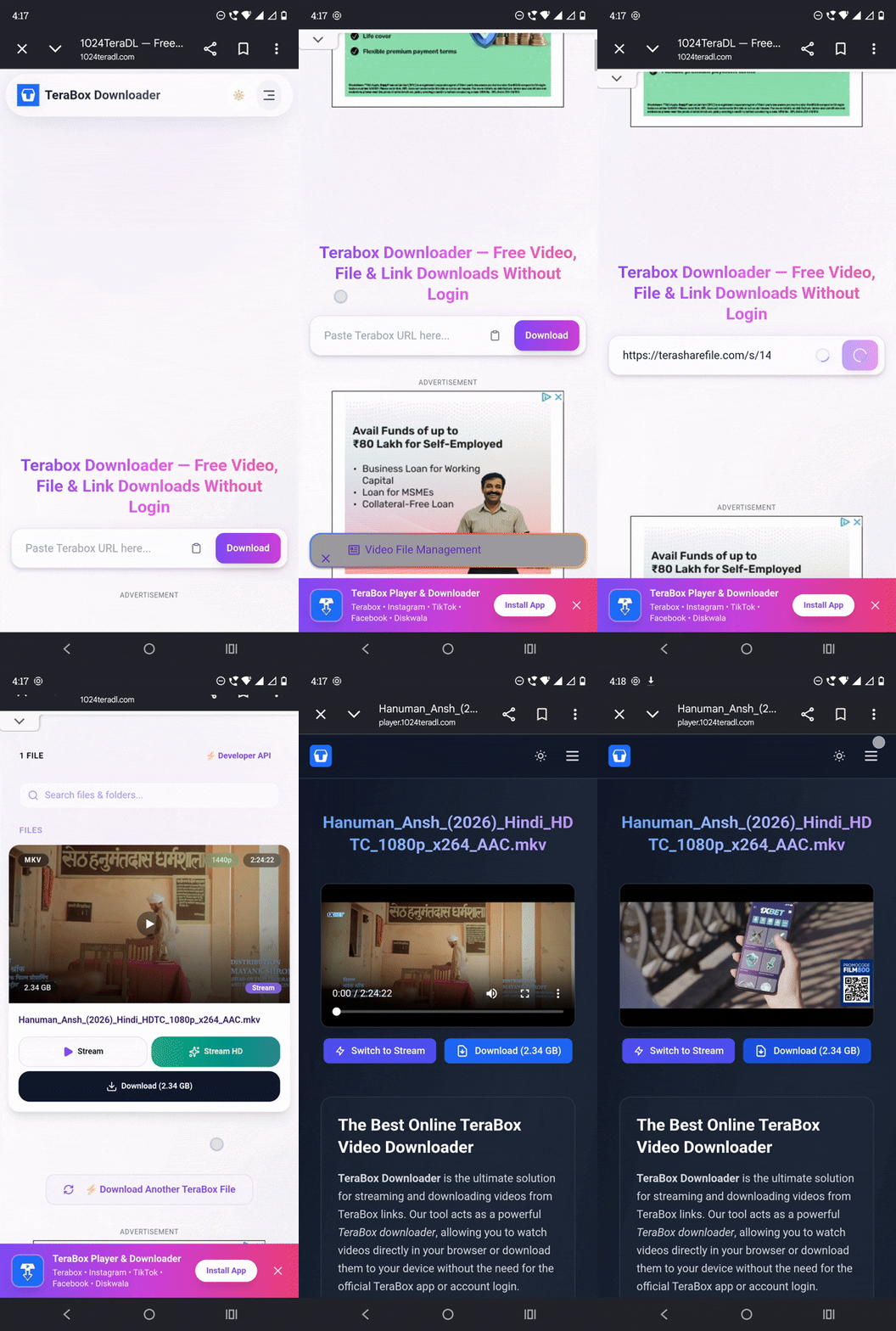
After that ad finished, the actual paste box wasn’t even visible on screen, it was buried below more ad space, so I had to scroll down to find it. I pasted the link, and instead of going straight to a result, another cover advertisement appeared first. Once I scrolled past that, I could finally see the video.
Clicking play or download didn’t keep me on the same page either. It redirected to a different subdomain entirely before the actual stream and download options showed up. The file did eventually download from there, but the entire path to it was ad after ad after ad, with the useful part of the interface squeezed into whatever space was left over. Worth noting since their own site describes the experience elsewhere as clean and ad-minimal with unlimited download speeds, which didn’t match what actually showed up on screen during this test.
5. iTeraPlay.com
iTeraPlay.com started with a wall before I’d even pasted anything: a notice reading “Guest limit 0/5 plays or downloads,” pushing toward login or signup right at the top of the page.
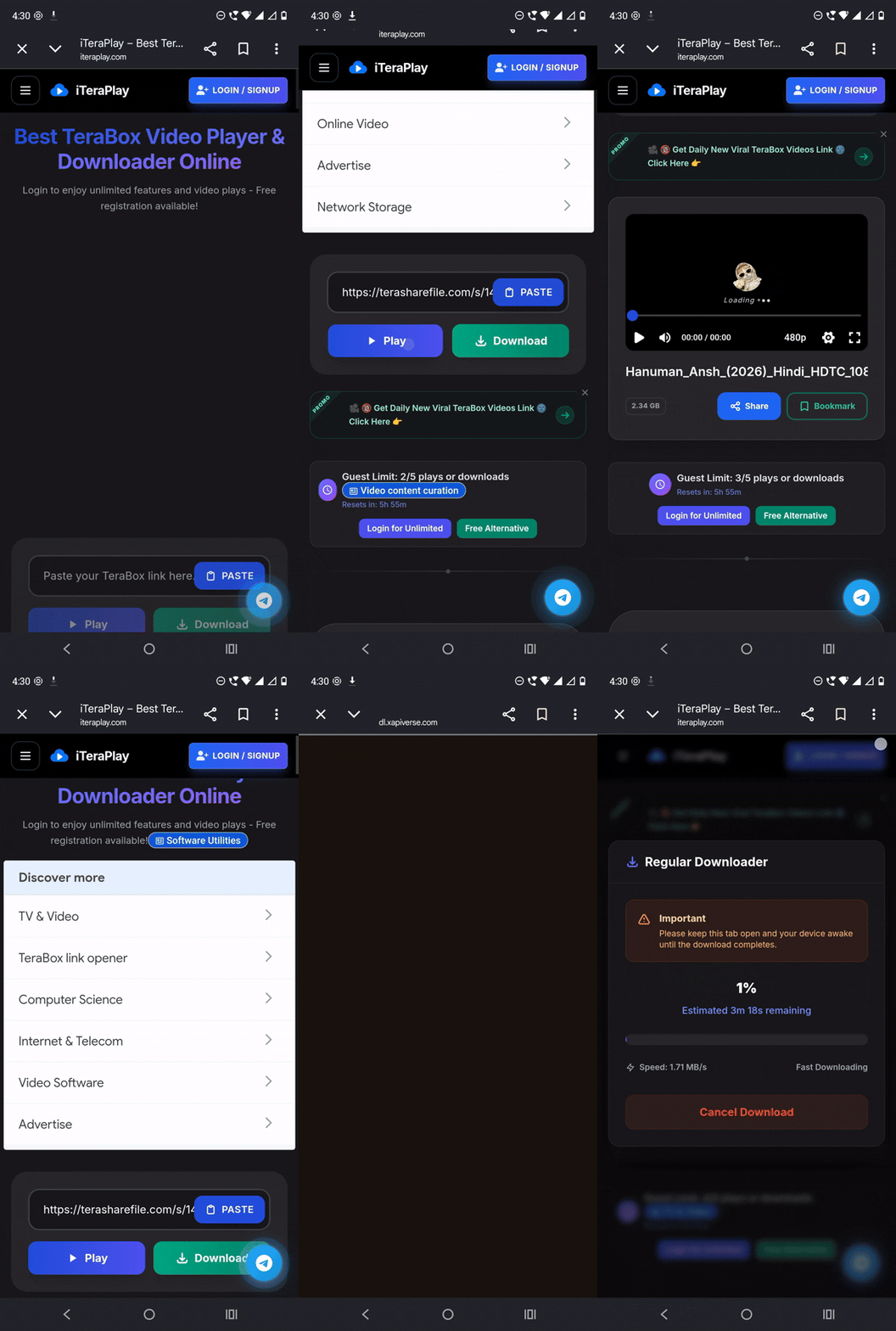
The layout itself was the most cluttered of the five, packed with elements from top to bottom, though the paste box was at least visible without much hunting. I pasted the link, and to its credit, there was no fetching delay: the play and download options appeared immediately underneath, no spinner, no wait.
Clicking Play brought up Google text ads before the stream option appeared beneath them. There was also a share and bookmark menu sitting next to the player, which felt like extra clutter rather than something most people downloading a single video actually need. Clicking Download gave two server choices, Server 1 (HD) and Server 2 (MP4). I tried both. Speed was about the same either way, so the “choice” didn’t end up mattering much in practice.
Side-by-Side Comparison
| What I Checked | iTeraBox Downloader | GetinDevice | TeraDownloader.com | 1024TeraDL.com | iTeraPlay.com |
|---|---|---|---|---|---|
| App install prompt | None | None | Yes, on arrival | No, but heavy ads instead | No, but guest limit wall |
| Ads during use | None | Some display ads, very few popups | None directly, but app push | Multiple, including forced “watch to continue” | Text ads before stream |
| Steps to reach download | Paste, click, save | Paste, click, save | Paste, verify, pick from 4 confusing options, wait, redirect, click again | Paste, close ads, watch ad, scroll, close another ad, redirect | Paste, pick server, download |
| Redirects | None | None | Yes, to a second page | Yes, to a separate subdomain | None |
| Guest restrictions | None | None | None noticed | None noticed | 0/5 plays/downloads for guests |
| Folder link support | Yes, lists each file separately | Yes | No (single files only, per their own FAQ) | Not tested here | Not tested here |
| In-browser player | Yes | Yes | Yes (Watch Online) | Yes, after redirect | Yes, after text ads |
| Interface clarity | Clear, single paste box and button | Clear, one obvious action at a time | Confusing, four overlapping buttons | Ad-heavy, hard to find the actual tool | Cluttered but functional |
| Overall friction | Lowest | Low | High | Highest | Medium |
What Actually Separates a Good Tool From a Frustrating One
A lot of TeraBox downloader roundups compare marketing copy: who claims to be faster, who claims to have no ads, who claims unlimited downloads. Nearly every one of these tools says all three about itself, so that copy doesn’t tell you much. What actually separates them, based on running the same link through all five, comes down to a shorter list:
Screens between paste and download. iTeraBox and GetinDevice each took two clicks total: paste, then save. TeraDownloader.com took a dismissed app prompt, a Cloudflare check, a four-option screen, a stalled load, and a second page before the real button appeared. When you just want one file, that gap is the whole experience.
Where the ads sit. A forced “watch to continue” ad before the tool even loads, like on 1024TeraDL, is a different level of friction than a banner sitting quietly next to a working download button. Several of these tools blur that line more than their own FAQs suggest. iTeraBox had no ads at all, and GetinDevice kept its ads to the side of the tool with very few popups, so neither one ever blocked the download.
Whether “free” has a hidden ceiling. iTeraPlay’s guest limit of 0/5 plays or downloads isn’t disclosed until you’re already on the page. Fine if you need one file occasionally, a real constraint if you’re pulling several TeraBox links in one sitting.
Whether it handles folders, not just single videos. A large share of TeraBox links floating around are shared folders, not one clip: course dumps, project archives, whole photo sets. TeraDownloader.com’s own FAQ confirms it only works with individual file links, so a folder link is a dead end there no matter how the rest of the tool performs. iTeraBox and GetinDevice both list every file inside a folder link separately and correctly label non-video files like ZIP archives, PDFs, and APKs, instead of forcing everything through a video-shaped result.
None of these problems showed up with iTeraBox or GetinDevice. No app push, no forced ad, no guest cap, no redirect chain, just a paste box, a clear choice between streaming and saving, and a download that started where it said it would.
Common Questions About TeraBox Downloaders
Why does TeraBox throttle downloads in the first place?
TeraBox gives away 1TB of free storage, which is a lot more than most competitors offer for free. To make that sustainable, the free tier deliberately limits download speed and pushes app installs and premium upgrades. It’s a business decision, not a technical limit on the file itself.
Are these third-party downloaders safe to use?
None of the tools I tested asked for a TeraBox login or password, which is the main safety line to watch for. A tool asking for your actual TeraBox account credentials is a red flag; a tool that just fetches a public share link is doing the same thing TeraBox’s own preview page does. The ad-heavy and app-pushing behavior on some of these sites isn’t a security issue by itself, it’s just an experience issue, though it’s still worth running any downloaded ZIP or APK file through your device’s antivirus before opening it, the same way you would with any file from a source you don’t personally know. If you want a deeper breakdown of how downloader tools compare to browser extensions and Telegram bots on the safety front generally, this guide covers it in more detail.
Why did some tools redirect me to a completely different page?
This usually comes down to how the site is monetized. A redirect to a separate subdomain or a fresh page often exists specifically to serve another ad impression or push another app install before handing over the actual file.
Does a “guest limit” mean the tool is better once you sign up?
Not necessarily better, just gated. iTeraPlay’s 0/5 plays/downloads limit for guests is a signup nudge, similar in spirit to what TeraBox itself does with free accounts. Whether that trade is worth it depends on how often you’re pulling TeraBox links, not on any extra capability you’re missing as a guest. Neither iTeraBox nor GetinDevice has a guest limit at all.
Do I need to use Chrome specifically, like TeraDownloader.com recommends?
TeraDownloader.com’s own page includes a note saying to use Chrome for the best experience and warns that some features may not work correctly in other browsers, which is worth knowing if you’re on Safari or Firefox by default. Neither iTeraBox nor GetinDevice showed any browser-specific warning during testing.
Does downloading through a third-party tool reduce video quality?
Not on its own. These tools generally fetch the file as it exists on TeraBox’s servers rather than re-encoding it, so quality should match whatever the original upload was. If a video looks low resolution after downloading, that’s almost always because it was uploaded at that resolution in the first place, not something the downloader did to it. This one covers the quality question in more depth if you want to compare it against other platforms too, not just TeraBox.
What if a TeraBox link asks for an extraction code?
An extraction code is a short password the uploader can set when creating the share link. TeraBox checks it on its own servers, so no downloader can skip or guess it, and any site claiming to “crack” protected links is not being honest. You need to get the code from whoever shared the link, then enter it along with the link.
What if my TeraBox link isn’t working at all, on any of these tools?
That’s usually not a downloader problem, it’s a link problem: expired shares, deleted files, or a wrong URL format can all produce the same “link invalid” result no matter which tool you paste it into. This troubleshooting guide walks through the most common causes before you assume the tool itself is broken.
The Verdict
After running the same video through all five tools, the difference wasn’t subtle. TeraDownloader.com and 1024TeraDL.com both eventually delivered the file, but only after app-install prompts, ad walls, confusing option screens, or stalled loading states that took several minutes to resolve. iTeraPlay.com worked reasonably smoothly once past its guest-limit notice, though the cluttered layout and pre-stream ads add friction that isn’t necessary for something as simple as saving a video.
iTeraBox Downloader is my top pick. It’s a TeraBox link downloader built only for TeraBox, it’s completely ad-free, it needs no app or login, and it handles every official TeraBox link format, folder links, and non-video files without any fuss. Paste a link, get the file, nothing in between.
GetinDevice’s TeraBox downloader is a close second with the same clean flow. It does show some ads, but popups are minimal and nothing stands between you and the file. It’s also the better choice if you also download from Instagram, Facebook, TikTok, X, or other platforms and want one tool for everything. If you’re dealing with TeraBox links regularly, especially on a slow connection where every extra ad or redirect eats real time, either of these two will save you the frustration the rest of the list comes with.